通知
简介
除了支持发送电子邮件之外,Laravel 还支持通过多种投递渠道发送通知,包括电子邮件、短信(通过 Vonage,前身为 Nexmo)和 Slack。此外,还创建了各种社区构建的通知渠道,用于通过数十种不同的渠道发送通知!通知也可以存储在数据库中,以便在您的 Web 界面中显示。
通常,通知应该是简短的信息性消息,用于告知用户您的应用程序中发生了什么。例如,如果您正在编写一个计费应用程序,您可能希望通过电子邮件和短信渠道向用户发送“发票已支付”通知。
生成通知
在 Laravel 中,每个通知都由一个单独的类表示,该类通常存储在 app/Notifications 目录中。如果您在应用程序中没有看到此目录,请不必担心 - 当您运行 make:notification Artisan 命令时,系统将为您创建它:
bash
php artisan make:notification InvoicePaid此命令将在您的 app/Notifications 目录中放置一个新的通知类。每个通知类都包含一个 via 方法和可变数量的消息构建方法(例如 toMail 或 toDatabase),这些方法将通知转换为为特定渠道定制的消息。
发送通知
使用 Notifiable Trait
通知可以通过两种方式发送:使用 Notifiable trait 的 notify 方法,或者使用 Notification 外观。Notifiable trait 默认包含在您的应用程序的 App\Models\User 模型中:
php
<?php

namespace App\Models;

use Illuminate\Foundation\Auth\User as Authenticatable;
use Illuminate\Notifications\Notifiable;

class User extends Authenticatable
{
    use Notifiable;
}
此 trait 提供的 notify 方法期望接收一个通知实例:
php
use App\Notifications\InvoicePaid;

$user->notify(new InvoicePaid($invoice));
[!NOTE]
请记住,您可以在任何模型上使用Notifiabletrait。您不仅限于将其包含在User模型中。
使用 Notification Facade
或者,您可以通过 Notification 外观发送通知。当您需要向多个可通知实体(例如用户集合)发送通知时,此方法非常有用。要使用外观发送通知,请将所有可通知实体和通知实例传递给 send 方法:
php
use Illuminate\Support\Facades\Notification;

Notification::send($users, new InvoicePaid($invoice));
您还可以使用 sendNow 方法立即发送通知。即使通知实现了 ShouldQueue 接口,此方法也会立即发送通知:
php
Notification::sendNow($developers, new DeploymentCompleted($deployment));指定投递渠道
每个通知类都有一个 via 方法,用于确定通知将通过哪些渠道投递。通知可以通过 mail、database、broadcast、vonage 和 slack 渠道发送。
[!NOTE]
如果您想使用其他投递渠道,例如 Telegram 或 Pusher,请查看社区驱动的 Laravel 通知渠道网站。
via 方法接收一个 $notifiable 实例,该实例将是通知发送到的类的实例。您可以使用 $notifiable 来确定通知应通过哪些渠道投递:
php
/**
 * Get the notification's delivery channels.
 *
 * @return array<int, string>
 */
public function via(object $notifiable): array
{
    return $notifiable->prefers_sms ? ['vonage'] : ['mail', 'database'];
}
通知队列
[!WARNING]
在通知入队之前,您应该配置队列并启动一个工作进程。
发送通知可能需要时间,特别是如果渠道需要进行外部 API 调用来投递通知时。为了加快应用程序的响应时间,可以通过在类中添加 ShouldQueue 接口和 Queueable trait 来让通知进入队列。对于所有使用 make:notification 命令生成的通知,此接口和 trait 都已导入,因此您可以立即将它们添加到您的通知类中:
php
<?php

namespace App\Notifications;

use Illuminate\Bus\Queueable;
use Illuminate\Contracts\Queue\ShouldQueue;
use Illuminate\Notifications\Notification;

class InvoicePaid extends Notification implements ShouldQueue
{
    use Queueable;

    // ...
}
一旦 ShouldQueue 接口已添加到您的通知中,您就可以像往常一样发送通知。Laravel 将检测类上的 ShouldQueue 接口,并自动将通知的投递放入队列:
php
$user->notify(new InvoicePaid($invoice));当通知入队时,将为每个收件人和渠道组合创建一个队列任务。例如,如果您的通知有三个收件人和两个渠道,将有六个任务被分派到队列中。
延迟通知
如果您想延迟通知的投递,您可以将 delay 方法链式调用到通知实例上:
php
$delay = now()->addMinutes(10);

$user->notify((new InvoicePaid($invoice))->delay($delay));
您可以向 delay 方法传递一个数组,以指定特定渠道的延迟时间:
php
$user->notify((new InvoicePaid($invoice))->delay([
    'mail' => now()->addMinutes(5),
    'sms' => now()->addMinutes(10),
]));
或者,您可以在通知类本身上定义 withDelay 方法。withDelay 方法应返回一个包含渠道名称和延迟值的数组:
php
/**
 * Determine the notification's delivery delay.
 *
 * @return array<string, \Illuminate\Support\Carbon>
 */
public function withDelay(object $notifiable): array
{
    return [
        'mail' => now()->addMinutes(5),
        'sms' => now()->addMinutes(10),
    ];
}
自定义通知队列连接
默认情况下,队列通知将使用应用程序的默认队列连接进行入队。如果您想为特定通知指定一个不同的连接,您可以在通知的构造函数中调用 onConnection 方法:
php
<?php

namespace App\Notifications;

use Illuminate\Bus\Queueable;
use Illuminate\Contracts\Queue\ShouldQueue;
use Illuminate\Notifications\Notification;

class InvoicePaid extends Notification implements ShouldQueue
{
    use Queueable;

    /**
     * Create a new notification instance.
     */
    public function __construct()
    {
        $this->onConnection('redis');
    }
}
或者,如果您想为通知支持的每个通知渠道指定一个特定的队列连接,您可以在通知上定义一个 viaConnections 方法。此方法应返回一个包含渠道名称/队列连接名称对的数组:
php
/**
 * Determine which connections should be used for each notification channel.
 *
 * @return array<string, string>
 */
public function viaConnections(): array
{
    return [
        'mail' => 'redis',
        'database' => 'sync',
    ];
}
自定义通知渠道队列
如果您想为通知支持的每个通知渠道指定一个特定的队列,您可以在通知上定义一个 viaQueues 方法。此方法应返回一个包含渠道名称/队列名称对的数组:
php
/**
 * Determine which queues should be used for each notification channel.
 *
 * @return array<string, string>
 */
public function viaQueues(): array
{
    return [
        'mail' => 'mail-queue',
        'slack' => 'slack-queue',
    ];
}
自定义队列通知任务属性
您可以通过在通知类上定义属性来自定义底层队列任务的行为。这些属性将被发送通知的队列任务继承:
php
<?php

namespace App\Notifications;

use Illuminate\Bus\Queueable;
use Illuminate\Contracts\Queue\ShouldQueue;
use Illuminate\Notifications\Notification;

class InvoicePaid extends Notification implements ShouldQueue
{
    use Queueable;

    /**
     * The number of times the notification may be attempted.
     *
     * @var int
     */
    public $tries = 5;

    /**
     * The number of seconds the notification can run before timing out.
     *
     * @var int
     */
    public $timeout = 120;

    /**
     * The maximum number of unhandled exceptions to allow before failing.
     *
     * @var int
     */
    public $maxExceptions = 3;

    // ...
}如果您想通过加密来确保队列通知数据的隐私和完整性,请将 ShouldBeEncrypted 接口添加到您的通知类中:
php
<?php

namespace App\Notifications;

use Illuminate\Bus\Queueable;
use Illuminate\Contracts\Queue\ShouldBeEncrypted;
use Illuminate\Contracts\Queue\ShouldQueue;
use Illuminate\Notifications\Notification;

class InvoicePaid extends Notification implements ShouldQueue, ShouldBeEncrypted
{
    use Queueable;

    // ...
}
除了直接在通知类上定义这些属性之外,您还可以定义 backoff 和 retryUntil 方法,以指定队列通知任务的退避策略和重试超时:
php
use DateTime;

/**
 * Calculate the number of seconds to wait before retrying the notification.
 */
public function backoff(): int
{
    return 3;
}

/**
 * Determine the time at which the notification should timeout.
 */
public function retryUntil(): DateTime
{
    return now()->addMinutes(5);
}
[!NOTE]
有关这些任务属性和方法的更多信息,请查阅有关队列任务的文档。
队列通知中间件
队列通知可以像队列任务一样定义中间件。要开始使用,请在通知类上定义一个 middleware 方法。middleware 方法将接收 $notifiable 和 $channel 变量,这允许您根据通知的目的地自定义返回的中间件:
php
use Illuminate\Queue\Middleware\RateLimited;

/**
 * Get the middleware the notification job should pass through.
 *
 * @return array<int, object>
 */
public function middleware(object $notifiable, string $channel)
{
    return match ($channel) {
        'mail' => [new RateLimited('postmark')],
        'slack' => [new RateLimited('slack')],
        default => [],
    };
}
队列通知与数据库事务
当队列通知在数据库事务中被分派时,它们可能会在数据库事务提交之前被队列处理。发生这种情况时,您在数据库事务期间对模型或数据库记录所做的任何更新可能尚未反映在数据库中。此外,在事务中创建的任何模型或数据库记录可能不存在于数据库中。如果您的通知依赖于这些模型,则在处理发送队列通知的任务时可能会发生意外错误。
如果您的队列连接的 after_commit 配置选项设置为 false,您仍然可以在发送通知时调用 afterCommit 方法,以指示特定队列通知应在所有打开的数据库事务提交后分派:
php
use App\Notifications\InvoicePaid;

$user->notify((new InvoicePaid($invoice))->afterCommit());
或者,您可以在通知的构造函数中调用 afterCommit 方法:
php
<?php

namespace App\Notifications;

use Illuminate\Bus\Queueable;
use Illuminate\Contracts\Queue\ShouldQueue;
use Illuminate\Notifications\Notification;

class InvoicePaid extends Notification implements ShouldQueue
{
    use Queueable;

    /**
     * Create a new notification instance.
     */
    public function __construct()
    {
        $this->afterCommit();
    }
}
[!NOTE]
要了解更多关于解决这些问题的信息,请查阅有关队列任务和数据库事务的文档。
判断队列通知是否应发送
队列通知被分派到队列进行后台处理后,通常会被队列工作进程接收并发送给其预期的收件人。
但是,如果您想在队列工作进程处理队列通知后,最终决定是否发送该通知,您可以在通知类上定义一个 shouldSend 方法。如果此方法返回 false,则通知将不会发送:
php
/**
 * Determine if the notification should be sent.
 */
public function shouldSend(object $notifiable, string $channel): bool
{
    return $this->invoice->isPaid();
}
按需通知
有时您可能需要向未存储为应用程序“用户”的人发送通知。使用 Notification 外观的 route 方法,您可以在发送通知之前指定临时的通知路由信息:
php
use Illuminate\Broadcasting\Channel;
use Illuminate\Support\Facades\Notification;

Notification::route('mail', 'taylor@example.com')
    ->route('vonage', '5555555555')
    ->route('slack', '#slack-channel')
    ->route('broadcast', [new Channel('channel-name')])
    ->notify(new InvoicePaid($invoice));
如果您想在向 mail 路由发送按需通知时提供收件人的姓名,您可以提供一个数组,其中包含电子邮件地址作为键,姓名作为数组中第一个元素的值:
php
Notification::route('mail', [
    'barrett@example.com' => 'Barrett Blair',
])->notify(new InvoicePaid($invoice));
使用 routes 方法,您可以一次性为多个通知渠道提供临时的路由信息:
php
Notification::routes([
    'mail' => ['barrett@example.com' => 'Barrett Blair'],
    'vonage' => '5555555555',
])->notify(new InvoicePaid($invoice));
邮件通知
格式化邮件消息
如果通知支持作为电子邮件发送,您应该在通知类上定义一个 toMail 方法。此方法将接收一个 $notifiable 实体,并应返回一个 Illuminate\Notifications\Messages\MailMessage 实例。
MailMessage 类包含一些简单的方法,可帮助您构建事务性电子邮件消息。邮件消息可以包含文本行和“行动号召”。让我们看一个 toMail 方法的示例:
php
/**
 * Get the mail representation of the notification.
 */
public function toMail(object $notifiable): MailMessage
{
    $url = url('/invoice/'.$this->invoice->id);

    return (new MailMessage)
        ->greeting('Hello!')
        ->line('One of your invoices has been paid!')
        ->lineIf($this->amount > 0, "Amount paid: {$this->amount}")
        ->action('View Invoice', $url)
        ->line('Thank you for using our application!');
}
[!NOTE]
请注意,我们在toMail方法中使用了$this->invoice->id。您可以将通知生成消息所需的任何数据传递到通知的构造函数中。
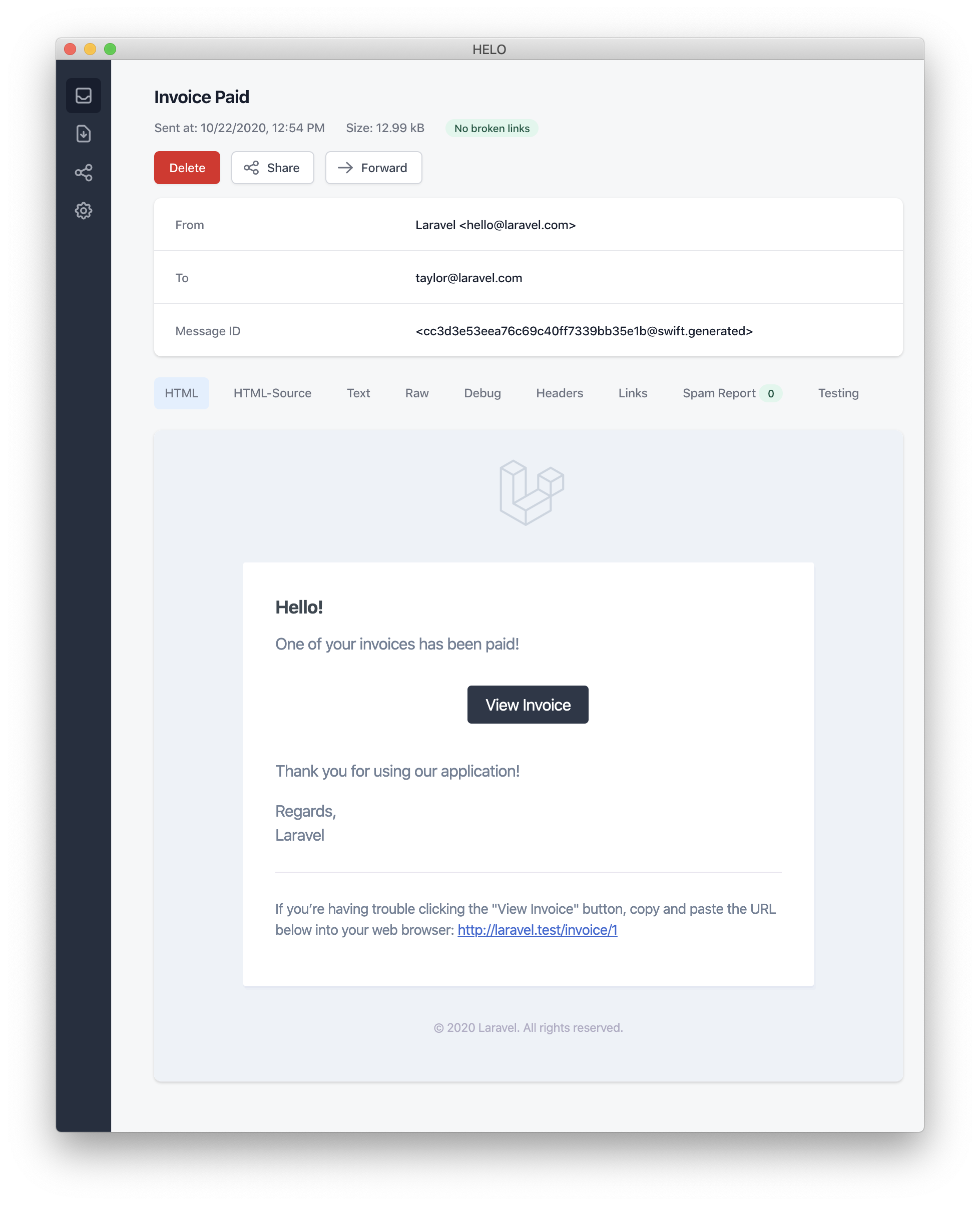
在此示例中,我们注册了一个问候语、一行文本、一个行动号召,然后是另一行文本。MailMessage 对象提供的这些方法使格式化小型事务性电子邮件变得简单快捷。然后,邮件渠道会将消息组件转换为精美、响应式的 HTML 电子邮件模板,并带有一个纯文本对应项。以下是 mail 渠道生成的电子邮件示例:
[!NOTE]
发送邮件通知时,请务必在config/app.php配置文件中设置name配置选项。此值将用于您的邮件通知消息的页眉和页脚。
错误消息
有些通知会告知用户错误,例如发票支付失败。您可以通过在构建消息时调用 error 方法来指示邮件消息是关于错误的。当在邮件消息上使用 error 方法时,行动号召按钮将变为红色而不是黑色:
php
/**
 * Get the mail representation of the notification.
 */
public function toMail(object $notifiable): MailMessage
{
    return (new MailMessage)
        ->error()
        ->subject('Invoice Payment Failed')
        ->line('...');
}
其他邮件通知格式化选项
除了在通知类中定义文本“行”之外,您还可以使用 view 方法指定一个自定义模板,该模板应用于渲染通知电子邮件:
php
/**
 * Get the mail representation of the notification.
 */
public function toMail(object $notifiable): MailMessage
{
    return (new MailMessage)->view(
        'mail.invoice.paid', ['invoice' => $this->invoice]
    );
}
您可以通过将视图名称作为传递给 view 方法的数组的第二个元素来为邮件消息指定一个纯文本视图:
php
/**
 * Get the mail representation of the notification.
 */
public function toMail(object $notifiable): MailMessage
{
    return (new MailMessage)->view(
        ['mail.invoice.paid', 'mail.invoice.paid-text'],
        ['invoice' => $this->invoice]
    );
}
或者,如果您的消息只有纯文本视图,您可以使用 text 方法:
php
/**
 * Get the mail representation of the notification.
 */
public function toMail(object $notifiable): MailMessage
{
    return (new MailMessage)->text(
        'mail.invoice.paid-text', ['invoice' => $this->invoice]
    );
}
自定义发件人
默认情况下,电子邮件的发件人/发件地址在 config/mail.php 配置文件中定义。但是,您可以使用 from 方法为特定通知指定发件地址:
php
/**
 * Get the mail representation of the notification.
 */
public function toMail(object $notifiable): MailMessage
{
    return (new MailMessage)
        ->from('barrett@example.com', 'Barrett Blair')
        ->line('...');
}
自定义收件人
当通过 mail 渠道发送通知时,通知系统将自动在您的可通知实体上查找 email 属性。您可以通过在可通知实体上定义 routeNotificationForMail 方法来自定义用于投递通知的电子邮件地址:
php
<?php

namespace App\Models;

use Illuminate\Foundation\Auth\User as Authenticatable;
use Illuminate\Notifications\Notifiable;
use Illuminate\Notifications\Notification;

class User extends Authenticatable
{
    use Notifiable;

    /**
     * Route notifications for the mail channel.
     *
     * @return  array<string, string>|string
     */
    public function routeNotificationForMail(Notification $notification): array|string
    {
        // Return email address only...
        return $this->email_address;

        // Return email address and name...
        return [$this->email_address => $this->name];
    }
}
自定义主题
默认情况下,电子邮件的主题是通知的类名,格式为“首字母大写”。因此,如果您的通知类名为 InvoicePaid,则电子邮件的主题将是 Invoice Paid。如果您想为消息指定不同的主题,您可以在构建消息时调用 subject 方法:
php
/**
 * Get the mail representation of the notification.
 */
public function toMail(object $notifiable): MailMessage
{
    return (new MailMessage)
        ->subject('Notification Subject')
        ->line('...');
}
自定义邮件程序
默认情况下,电子邮件通知将使用 config/mail.php 配置文件中定义的默认邮件程序发送。但是,您可以在构建消息时通过调用 mailer 方法在运行时指定不同的邮件程序:
php
/**
 * Get the mail representation of the notification.
 */
public function toMail(object $notifiable): MailMessage
{
    return (new MailMessage)
        ->mailer('postmark')
        ->line('...');
}
自定义模板
您可以通过发布通知包的资源来修改邮件通知使用的 HTML 和纯文本模板。运行此命令后,邮件通知模板将位于 resources/views/vendor/notifications 目录中:
bash
php artisan vendor:publish --tag=laravel-notifications附件
要向电子邮件通知添加附件,请在构建消息时使用 attach 方法。attach 方法接受文件的绝对路径作为其第一个参数:
php
/**
 * Get the mail representation of the notification.
 */
public function toMail(object $notifiable): MailMessage
{
    return (new MailMessage)
        ->greeting('Hello!')
        ->attach('/path/to/file');
}将文件附加到消息时,您还可以通过将 array 作为第二个参数传递给 attach 方法来指定显示名称和/或 MIME 类型:
php
/**
 * Get the mail representation of the notification.
 */
public function toMail(object $notifiable): MailMessage
{
    return (new MailMessage)
        ->greeting('Hello!')
        ->attach('/path/to/file', [
            'as' => 'name.pdf',
            'mime' => 'application/pdf',
        ]);
}
与在可邮寄对象中附加文件不同,您不能直接从存储磁盘使用 attachFromStorage 附加文件。您应该使用 attach 方法并提供存储磁盘上文件的绝对路径。或者,您可以从 toMail 方法返回一个可邮寄对象:
php
use App\Mail\InvoicePaid as InvoicePaidMailable;

/**
 * Get the mail representation of the notification.
 */
public function toMail(object $notifiable): Mailable
{
    return (new InvoicePaidMailable($this->invoice))
        ->to($notifiable->email)
        ->attachFromStorage('/path/to/file');
}
必要时,可以使用 attachMany 方法向消息附加多个文件:
php
/**
 * Get the mail representation of the notification.
 */
public function toMail(object $notifiable): MailMessage
{
    return (new MailMessage)
        ->greeting('Hello!')
        ->attachMany([
            '/path/to/forge.svg',
            '/path/to/vapor.svg' => [
                'as' => 'Logo.svg',
                'mime' => 'image/svg+xml',
            ],
        ]);
}
原始数据附件
attachData 方法可用于将原始字节字符串作为附件附加。调用 attachData 方法时,您应该提供要分配给附件的文件名:
php
/**
 * Get the mail representation of the notification.
 */
public function toMail(object $notifiable): MailMessage
{
    return (new MailMessage)
        ->greeting('Hello!')
        ->attachData($this->pdf, 'name.pdf', [
            'mime' => 'application/pdf',
        ]);
}
添加标签和元数据
一些第三方电子邮件提供商(如 Mailgun 和 Postmark)支持消息“标签”和“元数据”,这些可用于对您的应用程序发送的电子邮件进行分组和跟踪。您可以通过 tag 和 metadata 方法向电子邮件消息添加标签和元数据:
php
/**
 * Get the mail representation of the notification.
 */
public function toMail(object $notifiable): MailMessage
{
    return (new MailMessage)
        ->greeting('Comment Upvoted!')
        ->tag('upvote')
        ->metadata('comment_id', $this->comment->id);
}
如果您的应用程序使用 Mailgun 驱动程序,您可以查阅 Mailgun 的文档以获取有关标签和元数据的更多信息。同样,也可以查阅 Postmark 文档以获取有关其对标签和元数据支持的更多信息。
如果您的应用程序使用 Amazon SES 发送电子邮件,您应该使用 metadata 方法将 SES“标签”附加到消息中。
自定义 Symfony 消息
MailMessage 类的 withSymfonyMessage 方法允许您注册一个闭包,该闭包将在发送消息之前与 Symfony Message 实例一起调用。这使您有机会在消息投递之前对其进行深度自定义:
php
use Symfony\Component\Mime\Email;

/**
 * Get the mail representation of the notification.
 */
public function toMail(object $notifiable): MailMessage
{
    return (new MailMessage)
        ->withSymfonyMessage(function (Email $message) {
            $message->getHeaders()->addTextHeader(
                'Custom-Header', 'Header Value'
            );
        });
}
使用可邮寄对象
如果需要,您可以从通知的 toMail 方法返回一个完整的可邮寄对象。当返回 Mailable 而不是 MailMessage 时,您需要使用可邮寄对象的 to 方法指定消息收件人:
php
use App\Mail\InvoicePaid as InvoicePaidMailable;
use Illuminate\Mail\Mailable;

/**
 * Get the mail representation of the notification.
 */
public function toMail(object $notifiable): Mailable
{
    return (new InvoicePaidMailable($this->invoice))
        ->to($notifiable->email);
}
可邮寄对象与按需通知
如果您正在发送按需通知,则传递给 toMail 方法的 $notifiable 实例将是 Illuminate\Notifications\AnonymousNotifiable 的实例,它提供了一个 routeNotificationFor 方法,可用于检索按需通知应发送到的电子邮件地址:
php
use App\Mail\InvoicePaid as InvoicePaidMailable;
use Illuminate\Notifications\AnonymousNotifiable;
use Illuminate\Mail\Mailable;

/**
 * Get the mail representation of the notification.
 */
public function toMail(object $notifiable): Mailable
{
    $address = $notifiable instanceof AnonymousNotifiable
        ? $notifiable->routeNotificationFor('mail')
        : $notifiable->email;

    return (new InvoicePaidMailable($this->invoice))
        ->to($address);
}
预览邮件通知
在设计邮件通知模板时,像典型的 Blade 模板一样,在浏览器中快速预览渲染的邮件消息很方便。因此,Laravel 允许您直接从路由闭包或控制器返回由邮件通知生成的任何邮件消息。当返回 MailMessage 时,它将在浏览器中渲染和显示,从而允许您快速预览其设计,而无需将其发送到实际的电子邮件地址:
php
use App\Models\Invoice;
use App\Notifications\InvoicePaid;

Route::get('/notification', function () {
    $invoice = Invoice::find(1);

    return (new InvoicePaid($invoice))
        ->toMail($invoice->user);
});
Markdown 邮件通知
Markdown 邮件通知允许您利用邮件通知的预构建模板,同时让您有更多自由编写更长、更自定义的消息。由于消息是用 Markdown 编写的,Laravel 能够为消息渲染精美、响应式的 HTML 模板,同时自动生成纯文本对应项。
生成消息
要生成带有相应 Markdown 模板的通知,您可以使用 make:notification Artisan 命令的 --markdown 选项:
bash
php artisan make:notification InvoicePaid --markdown=mail.invoice.paid与所有其他邮件通知一样,使用 Markdown 模板的通知应在其通知类上定义一个 toMail 方法。但是,不要使用 line 和 action 方法来构建通知,而是使用 markdown 方法来指定应使用的 Markdown 模板的名称。您可以将希望提供给模板的数据数组作为方法的第二个参数传递:
php
/**
 * Get the mail representation of the notification.
 */
public function toMail(object $notifiable): MailMessage
{
    $url = url('/invoice/'.$this->invoice->id);

    return (new MailMessage)
        ->subject('Invoice Paid')
        ->markdown('mail.invoice.paid', ['url' => $url]);
}
编写消息
Markdown 邮件通知结合了 Blade 组件和 Markdown 语法,使您能够轻松构建通知,同时利用 Laravel 预先制作的通知组件:
blade
<x-mail::message>
# Invoice Paid

Your invoice has been paid!

<x-mail::button :url="$url">
View Invoice
</x-mail::button>

Thanks,<br>
{{ config('app.name') }}
</x-mail::message>
[!NOTE]
编写 Markdown 电子邮件时不要使用过多的缩进。根据 Markdown 标准,Markdown 解析器会将缩进内容渲染为代码块。
按钮组件
按钮组件渲染一个居中按钮链接。该组件接受两个参数:url 和一个可选的 color。支持的颜色有 primary、green 和 red。您可以在一个通知中添加任意数量的按钮组件:
blade
<x-mail::button :url="$url" color="green">
View Invoice
</x-mail::button>
面板组件
面板组件在具有与通知其余部分略有不同背景颜色的面板中渲染给定的文本块。这使您可以将注意力吸引到给定的文本块:
blade
<x-mail::panel>
This is the panel content.
</x-mail::panel>
表格组件
表格组件允许您将 Markdown 表格转换为 HTML 表格。该组件接受 Markdown 表格作为其内容。表格列对齐使用默认的 Markdown 表格对齐语法进行支持:
blade
<x-mail::table>
| Laravel       | Table         | Example       |
| ------------- | :-----------: | ------------: |
| Col 2 is      | Centered      | $10           |
| Col 3 is      | Right-Aligned | $20           |
</x-mail::table>
自定义组件
您可以将所有 Markdown 通知组件导出到自己的应用程序进行自定义。要导出这些组件,请使用 vendor:publish Artisan 命令发布 laravel-mail 资源标签:
bash
php artisan vendor:publish --tag=laravel-mail此命令会将 Markdown 邮件组件发布到 resources/views/vendor/mail 目录。mail 目录将包含一个 html 目录和一个 text 目录,每个目录都包含所有可用组件的相应表示。您可以随意自定义这些组件。
自定义 CSS
导出组件后,resources/views/vendor/mail/html/themes 目录将包含一个 default.css 文件。您可以自定义此文件中的 CSS,您的样式将自动内联到 Markdown 通知 HTML 表示中。
如果您想为 Laravel 的 Markdown 组件构建一个全新的主题,您可以将 CSS 文件放在 html/themes 目录中。命名并保存 CSS 文件后,更新 mail 配置文件中的 theme 选项以匹配新主题的名称。
要自定义单个通知的主题,您可以在构建通知的邮件消息时调用 theme 方法。theme 方法接受发送通知时应使用的主题名称:
php
/**
 * Get the mail representation of the notification.
 */
public function toMail(object $notifiable): MailMessage
{
    return (new MailMessage)
        ->theme('invoice')
        ->subject('Invoice Paid')
        ->markdown('mail.invoice.paid', ['url' => $url]);
}
数据库通知
先决条件
database 通知渠道将通知信息存储在数据库表中。此表将包含通知类型以及描述通知的 JSON 数据结构等信息。
您可以查询该表以在应用程序的用户界面中显示通知。但是,在此之前,您需要创建一个数据库表来存储通知。您可以使用 make:notifications-table 命令生成一个具有正确表架构的迁移:
bash
php artisan make:notifications-table

php artisan migrate
[!NOTE]
如果您的可通知模型使用 UUID 或 ULID 主键,您应该在通知表迁移中将morphs方法替换为 uuidMorphs 或 ulidMorphs。
格式化数据库通知
如果通知支持存储在数据库表中,您应该在通知类上定义一个 toDatabase 或 toArray 方法。此方法将接收一个 $notifiable 实体,并应返回一个纯 PHP 数组。返回的数组将编码为 JSON 并存储在 notifications 表的 data 列中。让我们看一个 toArray 方法的示例:
php
/**
 * Get the array representation of the notification.
 *
 * @return array<string, mixed>
 */
public function toArray(object $notifiable): array
{
    return [
        'invoice_id' => $this->invoice->id,
        'amount' => $this->invoice->amount,
    ];
}当通知存储在应用程序的数据库中时,type 列将默认设置为通知的类名,read_at 列将为 null。但是,您可以通过在通知类中定义 databaseType 和 initialDatabaseReadAtValue 方法来自定义此行为:
php
use Illuminate\Support\Carbon;

/**
 * Get the notification's database type.
 */
public function databaseType(object $notifiable): string
{
    return 'invoice-paid';
}

/**
 * Get the initial value for the "read_at" column.
 */
public function initialDatabaseReadAtValue(): ?Carbon
{
    return null;
}
toDatabase 与 toArray
toArray 方法也由 broadcast 渠道使用,以确定要广播到您的 JavaScript 驱动的前端的数据。如果您希望为 database 和 broadcast 渠道提供两种不同的数组表示,您应该定义一个 toDatabase 方法而不是 toArray 方法。
访问通知
通知存储在数据库中后,您需要一种方便的方式从可通知实体访问它们。Illuminate\Notifications\Notifiable trait(包含在 Laravel 的默认 App\Models\User 模型中)包含一个 notifications Eloquent 关联,它返回实体的通知。要获取通知,您可以像访问任何其他 Eloquent 关联一样访问此方法。默认情况下,通知将按 created_at 时间戳排序,最新通知位于集合的开头:
php
$user = App\Models\User::find(1);

foreach ($user->notifications as $notification) {
    echo $notification->type;
}
如果您只想检索“未读”通知,您可以使用 unreadNotifications 关联。同样,这些通知将按 created_at 时间戳排序,最新通知位于集合的开头:
php
$user = App\Models\User::find(1);

foreach ($user->unreadNotifications as $notification) {
    echo $notification->type;
}
如果您只想检索“已读”通知,您可以使用 readNotifications 关联:
php
$user = App\Models\User::find(1);

foreach ($user->readNotifications as $notification) {
    echo $notification->type;
}
[!NOTE]
要从 JavaScript 客户端访问您的通知,您应该为您的应用程序定义一个通知控制器,该控制器返回可通知实体(例如当前用户)的通知。然后,您可以从 JavaScript 客户端向该控制器的 URL 发出 HTTP 请求。
将通知标记为已读
通常,当用户查看通知时,您会希望将其标记为“已读”。Illuminate\Notifications\Notifiable trait 提供了一个 markAsRead 方法,该方法会更新通知数据库记录上的 read_at 列:
php
$user = App\Models\User::find(1);

foreach ($user->unreadNotifications as $notification) {
    $notification->markAsRead();
}
但是,除了遍历每个通知之外,您还可以直接在通知集合上使用 markAsRead 方法:
php
$user->unreadNotifications->markAsRead();您还可以使用批量更新查询将所有通知标记为已读,而无需从数据库中检索它们:
php
$user = App\Models\User::find(1);

$user->unreadNotifications()->update(['read_at' => now()]);
您可以 delete 通知以将其完全从表中删除:
php
$user->notifications()->delete();广播通知
先决条件
在广播通知之前,您应该配置并熟悉 Laravel 的事件广播服务。事件广播提供了一种从您的 JavaScript 驱动的前端响应服务器端 Laravel 事件的方式。
格式化广播通知
broadcast 渠道使用 Laravel 的事件广播服务广播通知,允许您的 JavaScript 驱动的前端实时捕获通知。如果通知支持广播,您可以在通知类上定义一个 toBroadcast 方法。此方法将接收一个 $notifiable 实体,并应返回一个 BroadcastMessage 实例。如果 toBroadcast 方法不存在,将使用 toArray 方法收集应广播的数据。返回的数据将编码为 JSON 并广播到您的 JavaScript 驱动的前端。让我们看一个 toBroadcast 方法的示例:
php
use Illuminate\Notifications\Messages\BroadcastMessage;

/**
 * Get the broadcastable representation of the notification.
 */
public function toBroadcast(object $notifiable): BroadcastMessage
{
    return new BroadcastMessage([
        'invoice_id' => $this->invoice->id,
        'amount' => $this->invoice->amount,
    ]);
}
广播队列配置
所有广播通知都已入队等待广播。如果您想配置用于队列广播操作的队列连接或队列名称,您可以使用 BroadcastMessage 的 onConnection 和 onQueue 方法:
php
return (new BroadcastMessage($data))
    ->onConnection('sqs')
    ->onQueue('broadcasts');
自定义通知类型
除了您指定的数据之外,所有广播通知还具有一个 type 字段,其中包含通知的完整类名。如果您想自定义通知 type,您可以在通知类上定义一个 broadcastType 方法:
php
/**
 * Get the type of the notification being broadcast.
 */
public function broadcastType(): string
{
    return 'broadcast.message';
}
监听通知
通知将通过使用 {notifiable}.{id} 约定的私有渠道广播。因此,如果您正在向 ID 为 1 的 App\Models\User 实例发送通知,则该通知将通过 App.Models.User.1 私有渠道广播。当使用 Laravel Echo 时,您可以使用 notification 方法轻松监听渠道上的通知:
javascript
Echo.private('App.Models.User.' + userId)
    .notification((notification) => {
        console.log(notification.type);
    });
使用 React 或 Vue
Laravel Echo 包含 React 和 Vue 钩子,使监听通知变得轻松。要开始使用,请调用 useEchoNotification 钩子,该钩子用于监听通知。当消费组件卸载时,useEchoNotification 钩子将自动离开渠道:
javascript
import { useEchoNotification } from "@laravel/echo-react";

useEchoNotification(
    `App.Models.User.${userId}`,
    (notification) => {
        console.log(notification.type);
    },
);vue
<script setup lang="ts">
import { useEchoNotification } from "@laravel/echo-vue";

useEchoNotification(
    `App.Models.User.${userId}`,
    (notification) => {
        console.log(notification.type);
    },
);
</script>
默认情况下,该钩子监听所有通知。要指定您希望监听的通知类型,您可以向 useEchoNotification 提供一个字符串或类型数组:
javascript
import { useEchoNotification } from "@laravel/echo-react";

useEchoNotification(
    `App.Models.User.${userId}`,
    (notification) => {
        console.log(notification.type);
    },
    'App.Notifications.InvoicePaid',
);vue
<script setup lang="ts">
import { useEchoNotification } from "@laravel/echo-vue";

useEchoNotification(
    `App.Models.User.${userId}`,
    (notification) => {
        console.log(notification.type);
    },
    'App.Notifications.InvoicePaid',
);
</script>
您还可以指定通知载荷数据的形状,从而提供更高的类型安全性和编辑便利性:
typescript
type InvoicePaidNotification = {
    invoice_id: number;
    created_at: string;
};

useEchoNotification<InvoicePaidNotification>(
    `App.Models.User.${userId}`,
    (notification) => {
        console.log(notification.invoice_id);
        console.log(notification.created_at);
        console.log(notification.type);
    },
    'App.Notifications.InvoicePaid',
);
自定义通知渠道
如果您想自定义实体广播通知的广播渠道,您可以在可通知实体上定义一个 receivesBroadcastNotificationsOn 方法:
php
<?php

namespace App\Models;

use Illuminate\Broadcasting\PrivateChannel;
use Illuminate\Foundation\Auth\User as Authenticatable;
use Illuminate\Notifications\Notifiable;

class User extends Authenticatable
{
    use Notifiable;

    /**
     * The channels the user receives notification broadcasts on.
     */
    public function receivesBroadcastNotificationsOn(): string
    {
        return 'users.'.$this->id;
    }
}
短信通知
先决条件
Laravel 中的短信通知由 Vonage(前身为 Nexmo)提供支持。在通过 Vonage 发送通知之前,您需要安装 laravel/vonage-notification-channel 和 guzzlehttp/guzzle 包:
bash
composer require laravel/vonage-notification-channel guzzlehttp/guzzle该包包含一个配置文件。但是,您不需要将此配置文件导出到您自己的应用程序。您只需使用 VONAGE_KEY 和 VONAGE_SECRET 环境变量来定义您的 Vonage 公钥和密钥。
定义密钥后,您应该设置一个 VONAGE_SMS_FROM 环境变量,该变量定义您的短信消息默认应从哪个电话号码发送。您可以在 Vonage 控制面板中生成此电话号码:
ini
VONAGE_SMS_FROM=15556666666格式化短信通知
如果通知支持作为短信发送,您应该在通知类上定义一个 toVonage 方法。此方法将接收一个 $notifiable 实体,并应返回一个 Illuminate\Notifications\Messages\VonageMessage 实例:
php
use Illuminate\Notifications\Messages\VonageMessage;

/**
 * Get the Vonage / SMS representation of the notification.
 */
public function toVonage(object $notifiable): VonageMessage
{
    return (new VonageMessage)
        ->content('Your SMS message content');
}
Unicode 内容
如果您的短信消息将包含 Unicode 字符,您应该在构建 VonageMessage 实例时调用 unicode 方法:
php
use Illuminate\Notifications\Messages\VonageMessage;

/**
 * Get the Vonage / SMS representation of the notification.
 */
public function toVonage(object $notifiable): VonageMessage
{
    return (new VonageMessage)
        ->content('Your unicode message')
        ->unicode();
}
自定义“发件人”号码
如果您想从一个与 VONAGE_SMS_FROM 环境变量指定的电话号码不同的电话号码发送某些通知,您可以在 VonageMessage 实例上调用 from 方法:
php
use Illuminate\Notifications\Messages\VonageMessage;

/**
 * Get the Vonage / SMS representation of the notification.
 */
public function toVonage(object $notifiable): VonageMessage
{
    return (new VonageMessage)
        ->content('Your SMS message content')
        ->from('15554443333');
}
添加客户引用
如果您想跟踪每个用户、团队或客户的成本,您可以向通知添加“客户引用”。Vonage 将允许您使用此客户引用生成报告,以便您更好地了解特定客户的短信使用情况。客户引用可以是任意长度不超过 40 个字符的字符串:
php
use Illuminate\Notifications\Messages\VonageMessage;

/**
 * Get the Vonage / SMS representation of the notification.
 */
public function toVonage(object $notifiable): VonageMessage
{
    return (new VonageMessage)
        ->clientReference((string) $notifiable->id)
        ->content('Your SMS message content');
}
路由短信通知
要将 Vonage 通知路由到正确的电话号码,请在您的可通知实体上定义 routeNotificationForVonage 方法:
php
<?php

namespace App\Models;

use Illuminate\Foundation\Auth\User as Authenticatable;
use Illuminate\Notifications\Notifiable;
use Illuminate\Notifications\Notification;

class User extends Authenticatable
{
    use Notifiable;

    /**
     * Route notifications for the Vonage channel.
     */
    public function routeNotificationForVonage(Notification $notification): string
    {
        return $this->phone_number;
    }
}
Slack 通知
先决条件
在发送 Slack 通知之前,您应该通过 Composer 安装 Slack 通知渠道:
bash
composer require laravel/slack-notification-channel此外,您必须为您的 Slack 工作区创建一个 Slack App。
如果您只需要将通知发送到创建 App 的同一个 Slack 工作区,您应该确保您的 App 具有 chat:write、chat:write.public 和 chat:write.customize 范围。这些范围可以从 Slack 中的“OAuth & Permissions”App 管理选项卡添加。
接下来,复制 App 的“Bot User OAuth Token”并将其放入应用程序的 services.php 配置文件中的 slack 配置数组中。此令牌可以在 Slack 中的“OAuth & Permissions”选项卡上找到:
php
'slack' => [
    'notifications' => [
        'bot_user_oauth_token' => env('SLACK_BOT_USER_OAUTH_TOKEN'),
        'channel' => env('SLACK_BOT_USER_DEFAULT_CHANNEL'),
    ],
],
应用程序分发
如果您的应用程序将向您的应用程序用户拥有的外部 Slack 工作区发送通知,您将需要通过 Slack“分发”您的 App。App 分发可以在 Slack 中的 App“Manage Distribution”选项卡中进行管理。一旦您的 App 已分发,您可以使用 Socialite 代表您的应用程序用户获取 Slack Bot 令牌。
格式化 Slack 通知
如果通知支持作为 Slack 消息发送,您应该在通知类上定义一个 toSlack 方法。此方法将接收一个 $notifiable 实体,并应返回一个 Illuminate\Notifications\Slack\SlackMessage 实例。您可以使用 Slack 的 Block Kit API 构建丰富的通知。以下示例可以在 Slack 的 Block Kit 构建器中预览:
php
use Illuminate\Notifications\Slack\BlockKit\Blocks\ContextBlock;
use Illuminate\Notifications\Slack\BlockKit\Blocks\SectionBlock;
use Illuminate\Notifications\Slack\SlackMessage;

/**
 * Get the Slack representation of the notification.
 */
public function toSlack(object $notifiable): SlackMessage
{
    return (new SlackMessage)
        ->text('One of your invoices has been paid!')
        ->headerBlock('Invoice Paid')
        ->contextBlock(function (ContextBlock $block) {
            $block->text('Customer #1234');
        })
        ->sectionBlock(function (SectionBlock $block) {
            $block->text('An invoice has been paid.');
            $block->field("*Invoice No:*\n1000")->markdown();
            $block->field("*Invoice Recipient:*\ntaylor@laravel.com")->markdown();
        })
        ->dividerBlock()
        ->sectionBlock(function (SectionBlock $block) {
            $block->text('Congratulations!');
        });
}
使用 Slack 的 Block Kit 构建器模板
除了使用流畅的消息构建器方法来构建您的 Block Kit 消息外,您还可以将 Slack 的 Block Kit Builder 生成的原始 JSON 负载提供给 usingBlockKitTemplate 方法:
php
use Illuminate\Notifications\Slack\SlackMessage;
use Illuminate\Support\Str;

/**
 * Get the Slack representation of the notification.
 */
public function toSlack(object $notifiable): SlackMessage
{
    $template = <<<JSON
        {
          "blocks": [
            {
              "type": "header",
              "text": {
                "type": "plain_text",
                "text": "Team Announcement"
              }
            },
            {
              "type": "section",
              "text": {
                "type": "plain_text",
                "text": "We are hiring!"
              }
            }
          ]
        }
    JSON;

    return (new SlackMessage)
        ->usingBlockKitTemplate($template);
}
Slack 互动
Slack 的 Block Kit 通知系统提供了强大的功能来处理用户互动。要利用这些功能,您的 Slack App 应该启用“互动性”并配置一个指向您的应用程序提供的 URL 的“请求 URL”。这些设置可以在 Slack 中的“互动性与快捷方式”App 管理选项卡中进行管理。
在以下使用 actionsBlock 方法的示例中,Slack 将向您的“请求 URL”发送一个 POST 请求,其中包含一个负载,其中包含单击按钮的 Slack 用户、单击按钮的 ID 等。然后,您的应用程序可以根据负载确定要执行的操作。您还应该验证请求是由 Slack 发出的:
php
use Illuminate\Notifications\Slack\BlockKit\Blocks\ActionsBlock;
use Illuminate\Notifications\Slack\BlockKit\Blocks\ContextBlock;
use Illuminate\Notifications\Slack\BlockKit\Blocks\SectionBlock;
use Illuminate\Notifications\Slack\SlackMessage;

/**
 * Get the Slack representation of the notification.
 */
public function toSlack(object $notifiable): SlackMessage
{
    return (new SlackMessage)
        ->text('One of your invoices has been paid!')
        ->headerBlock('Invoice Paid')
        ->contextBlock(function (ContextBlock $block) {
            $block->text('Customer #1234');
        })
        ->sectionBlock(function (SectionBlock $block) {
            $block->text('An invoice has been paid.');
        })
        ->actionsBlock(function (ActionsBlock $block) {
             // ID defaults to "button_acknowledge_invoice"...
            $block->button('Acknowledge Invoice')->primary();

            // Manually configure the ID...
            $block->button('Deny')->danger()->id('deny_invoice');
        });
}
确认模态框
如果您希望用户在执行操作之前被要求确认该操作,您可以在定义按钮时调用 confirm 方法。confirm 方法接受一个消息和一个接收 ConfirmObject 实例的闭包:
php
use Illuminate\Notifications\Slack\BlockKit\Blocks\ActionsBlock;
use Illuminate\Notifications\Slack\BlockKit\Blocks\ContextBlock;
use Illuminate\Notifications\Slack\BlockKit\Blocks\SectionBlock;
use Illuminate\Notifications\Slack\BlockKit\Composites\ConfirmObject;
use Illuminate\Notifications\Slack\SlackMessage;

/**
 * Get the Slack representation of the notification.
 */
public function toSlack(object $notifiable): SlackMessage
{
    return (new SlackMessage)
        ->text('One of your invoices has been paid!')
        ->headerBlock('Invoice Paid')
        ->contextBlock(function (ContextBlock $block) {
            $block->text('Customer #1234');
        })
        ->sectionBlock(function (SectionBlock $block) {
            $block->text('An invoice has been paid.');
        })
        ->actionsBlock(function (ActionsBlock $block) {
            $block->button('Acknowledge Invoice')
                ->primary()
                ->confirm(
                    'Acknowledge the payment and send a thank you email?',
                    function (ConfirmObject $dialog) {
                        $dialog->confirm('Yes');
                        $dialog->deny('No');
                    }
                );
        });
}
检查 Slack 块
如果您想快速检查您正在构建的块,您可以在 SlackMessage 实例上调用 dd 方法。dd 方法将生成并转储一个指向 Slack Block Kit 构建器的 URL,该构建器在您的浏览器中显示负载和通知的预览。您可以向 dd 方法传递 true 以转储原始负载:
php
return (new SlackMessage)
    ->text('One of your invoices has been paid!')
    ->headerBlock('Invoice Paid')
    ->dd();
路由 Slack 通知
要将 Slack 通知路由到适当的 Slack 团队和渠道,请在您的可通知模型上定义 routeNotificationForSlack 方法。此方法可以返回以下三个值之一:
null- 这将路由延迟到通知本身中配置的渠道。您可以在构建SlackMessage时使用to方法在通知中配置渠道。- 指定要发送通知的 Slack 渠道的字符串,例如
#support-channel。 - 一个
SlackRoute实例,它允许您指定 OAuth 令牌和渠道名称,例如SlackRoute::make($this->slack_channel, $this->slack_token)。此方法应用于向外部工作区发送通知。
例如,从 routeNotificationForSlack 方法返回 #support-channel 将把通知发送到与您应用程序的 services.php 配置文件中 Bot 用户 OAuth 令牌关联的工作区中的 #support-channel 渠道:
php
<?php

namespace App\Models;

use Illuminate\Foundation\Auth\User as Authenticatable;
use Illuminate\Notifications\Notifiable;
use Illuminate\Notifications\Notification;

class User extends Authenticatable
{
    use Notifiable;

    /**
     * Route notifications for the Slack channel.
     */
    public function routeNotificationForSlack(Notification $notification): mixed
    {
        return '#support-channel';
    }
}
通知外部 Slack 工作区
[!NOTE]
在向外部 Slack 工作区发送通知之前,您的 Slack App 必须先分发。
当然,您通常会希望向您的应用程序用户拥有的 Slack 工作区发送通知。为此,您首先需要获取用户的 Slack OAuth 令牌。幸运的是,Laravel Socialite 包含一个 Slack 驱动程序,它允许您轻松地使用 Slack 验证您的应用程序用户并获取机器人令牌。
一旦您获得了机器人令牌并将其存储在应用程序的数据库中,您就可以使用 SlackRoute::make 方法将通知路由到用户的工作区。此外,您的应用程序可能需要为用户提供指定通知应发送到哪个渠道的机会:
php
<?php

namespace App\Models;

use Illuminate\Foundation\Auth\User as Authenticatable;
use Illuminate\Notifications\Notifiable;
use Illuminate\Notifications\Notification;
use Illuminate\Notifications\Slack\SlackRoute;

class User extends Authenticatable
{
    use Notifiable;

    /**
     * Route notifications for the Slack channel.
     */
    public function routeNotificationForSlack(Notification $notification): mixed
    {
        return SlackRoute::make($this->slack_channel, $this->slack_token);
    }
}
通知本地化
Laravel 允许您以 HTTP 请求当前区域设置之外的区域设置发送通知,即使通知进入队列也会记住此区域设置。
为了实现这一点,Illuminate\Notifications\Notification 类提供了一个 locale 方法来设置所需的语言。应用程序在评估通知时将切换到此区域设置,并在评估完成后恢复到先前的区域设置:
php
$user->notify((new InvoicePaid($invoice))->locale('es'));多个可通知条目的本地化也可以通过 Notification 外观实现:
php
Notification::locale('es')->send(
    $users, new InvoicePaid($invoice)
);
用户首选区域设置
有时,应用程序会存储每个用户的首选区域设置。通过在您的可通知模型上实现 HasLocalePreference 契约,您可以指示 Laravel 在发送通知时使用此存储的区域设置:
php
use Illuminate\Contracts\Translation\HasLocalePreference;

class User extends Model implements HasLocalePreference
{
    /**
     * Get the user's preferred locale.
     */
    public function preferredLocale(): string
    {
        return $this->locale;
    }
}
一旦您实现了该接口,Laravel 将在向模型发送通知和可邮寄对象时自动使用首选区域设置。因此,在使用此接口时无需调用 locale 方法:
php
$user->notify(new InvoicePaid($invoice));测试
您可以使用 Notification 外观的 fake 方法来阻止通知的发送。通常,发送通知与您实际测试的代码无关。最有可能的是,只需断言 Laravel 被指示发送给定通知就足够了。
调用 Notification 外观的 fake 方法后,您可以断言已指示将通知发送给用户,甚至可以检查通知收到的数据:
php
<?php

use App\Notifications\OrderShipped;
use Illuminate\Support\Facades\Notification;

test('orders can be shipped', function () {
    Notification::fake();

    // Perform order shipping...

    // Assert that no notifications were sent...
    Notification::assertNothingSent();

    // Assert a notification was sent to the given users...
    Notification::assertSentTo(
        [$user], OrderShipped::class
    );

    // Assert a notification was not sent...
    Notification::assertNotSentTo(
        [$user], AnotherNotification::class
    );

// Assert a notification was sent twice...
    Notification::assertSentTimes(WeeklyReminder::class, 2);

    // Assert that a given number of notifications were sent...
    Notification::assertCount(3);
});php
<?php

namespace Tests\Feature;

use App\Notifications\OrderShipped;
use Illuminate\Support\Facades\Notification;
use Tests\TestCase;

class ExampleTest extends TestCase
{
    public function test_orders_can_be_shipped(): void
    {
        Notification::fake();

        // Perform order shipping...

        // Assert that no notifications were sent...
        Notification::assertNothingSent();

        // Assert a notification was sent to the given users...
        Notification::assertSentTo(
            [$user], OrderShipped::class
        );

        // Assert a notification was not sent...
        Notification::assertNotSentTo(
            [$user], AnotherNotification::class
        );

        // Assert a notification was sent twice...
        Notification::assertSentTimes(WeeklyReminder::class, 2);

        // Assert that a given number of notifications were sent...
        Notification::assertCount(3);
    }
}
您可以将一个闭包传递给 assertSentTo 或 assertNotSentTo 方法,以断言发送的通知通过了给定的“真值测试”。如果至少有一个通知通过了给定的真值测试,则断言将成功:
php
Notification::assertSentTo(
    $user,
    function (OrderShipped $notification, array $channels) use ($order) {
        return $notification->order->id === $order->id;
    }
);
按需通知
如果您正在测试的代码发送按需通知,您可以通过 assertSentOnDemand 方法测试按需通知是否已发送:
php
Notification::assertSentOnDemand(OrderShipped::class);通过将闭包作为 assertSentOnDemand 方法的第二个参数,您可以确定按需通知是否已发送到正确的“路由”地址:
php
Notification::assertSentOnDemand(
    OrderShipped::class,
    function (OrderShipped $notification, array $channels, object $notifiable) use ($user) {
        return $notifiable->routes['mail'] === $user->email;
    }
);
通知事件
通知发送事件
当通知正在发送时,通知系统会分派 Illuminate\Notifications\Events\NotificationSending 事件。此事件包含“可通知”实体和通知实例本身。您可以在应用程序中为此事件创建事件监听器:
php
use Illuminate\Notifications\Events\NotificationSending;

class CheckNotificationStatus
{
    /**
     * Handle the event.
     */
    public function handle(NotificationSending $event): void
    {
        // ...
    }
}
如果 NotificationSending 事件的事件监听器从其 handle 方法返回 false,则通知将不会发送:
php
/**
 * Handle the event.
 */
public function handle(NotificationSending $event): bool
{
    return false;
}
在事件监听器中,您可以访问事件上的 notifiable、notification 和 channel 属性,以了解有关通知收件人或通知本身的更多信息:
php
/**
 * Handle the event.
 */
public function handle(NotificationSending $event): void
{
    // $event->channel
    // $event->notifiable
    // $event->notification
}
通知已发送事件
当通知发送时,通知系统会分派 Illuminate\Notifications\Events\NotificationSent 事件。此事件包含“可通知”实体和通知实例本身。您可以在应用程序中为此事件创建事件监听器:
php
use Illuminate\Notifications\Events\NotificationSent;

class LogNotification
{
    /**
     * Handle the event.
     */
    public function handle(NotificationSent $event): void
    {
        // ...
    }
}
在事件监听器中,您可以访问事件上的 notifiable、notification、channel 和 response 属性,以了解有关通知收件人或通知本身的更多信息:
php
/**
 * Handle the event.
 */
public function handle(NotificationSent $event): void
{
    // $event->channel
    // $event->notifiable
    // $event->notification
    // $event->response
}
自定义渠道
Laravel 附带了一些通知渠道,但您可能希望编写自己的驱动程序通过其他渠道投递通知。Laravel 使其变得简单。首先,定义一个包含 send 方法的类。该方法应接收两个参数:一个 $notifiable 和一个 $notification。
在 send 方法中,您可以调用通知上的方法来检索您的渠道理解的消息对象,然后以您希望的任何方式将通知发送到 $notifiable 实例:
php
<?php

namespace App\Notifications;

use Illuminate\Notifications\Notification;

class VoiceChannel
{
    /**
     * Send the given notification.
     */
    public function send(object $notifiable, Notification $notification): void
    {
        $message = $notification->toVoice($notifiable);

        // Send notification to the $notifiable instance...
    }
}
一旦您的通知渠道类已定义,您可以从任何通知的 via 方法返回类名。在此示例中,您的通知的 toVoice 方法可以返回您选择的任何对象来表示语音消息。例如,您可以定义自己的 VoiceMessage 类来表示这些消息:
php
<?php

namespace App\Notifications;

use App\Notifications\Messages\VoiceMessage;
use App\Notifications\VoiceChannel;
use Illuminate\Bus\Queueable;
use Illuminate\Contracts\Queue\ShouldQueue;
use Illuminate\Notifications\Notification;

class InvoicePaid extends Notification
{
    use Queueable;

    /**
     * Get the notification channels.
     */
    public function via(object $notifiable): string
    {
        return VoiceChannel::class;
    }

    /**
     * Get the voice representation of the notification.
     */
    public function toVoice(object $notifiable): VoiceMessage
    {
        // ...
    }
}