报表小部件
报告小部件可以用于后端仪表板以及其他后端报告容器中。报告小部件必须在插件注册文件中注册。
报告部件类位于插件的 reportwidgets 目录内。与任何其他插件类一样,通用部件控制器应归属于插件命名空间。类似于所有后端部件,报告部件使用局部视图和特殊的目录布局。示例目录布局:
├── reportwidgets
| ├── trafficsources
| | └── partials
| | └── _widget.php ← 分部文件
| └── TrafficSources.php ← 挂件类
类定义
此 create:reportwidget 命令生成一个后端报告小部件、视图和基本资产文件。第一个参数指定作者和插件名称。第二个参数指定报告小部件类名。
bash
php artisan create:reportwidget Acme.Blog TopPosts报表小部件类必须继承 Backend\Classes\ReportWidgetBase 类。报表小部件类定义示例。该类应该覆盖 render 方法,以便渲染小部件本身。
php
namespace RainLab\GoogleAnalytics\ReportWidgets;

use Backend\Classes\ReportWidgetBase;

class TrafficSources extends ReportWidgetBase
{
    public function render()
    {
        return $this->makePartial('widget');
    }
}
小部件局部视图可以包含您希望在小部件中显示的任何 HTML 标记。该标记应包裹在带有 report-widget 类的 DIV 元素中。使用 H3 元素输出小部件标题是首选。示例小部件局部视图:
html
<div class="report-widget">
    <h3>Traffic sources</h3>

    <div
        class="control-chart"
        data-control="chart-pie"
        data-size="200"
        data-center-text="180">
        <ul>
            <li>Direct <span>1000</span></li>
            <li>Social networks <span>800</span></li>
        </ul>
    </div>
</div>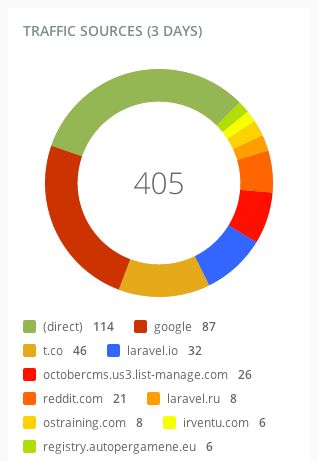
在报告小部件内部,你可以使用任何图表或指标,列表或任何你希望的其他标记。请记住报告小部件扩展了通用后端小部件并且你可以在你的报告小部件中使用任何小部件功能。下一个示例展示了一个列表报告小部件标记。
html
<div class="report-widget">
    <h3>Top pages</h3>

    <div class="table-container">
        <table class="table data" data-provides="rowlink">
            <thead>
                <tr>
                    <th><span>Page URL</span></th>
                    <th><span>Pageviews</span></th>
                    <th><span>% Pageviews</span></th>
                </tr>
            </thead>
            <tbody>
                <tr>
                    <td>/</td>
                    <td>90</td>
                    <td>
                        <div class="progress">
                            <div class="bar" style="90%"></div>
                            <a href="/">90%</a>
                        </div>
                    </td>
                </tr>
                <tr>
                    <td>/docs</td>
                    <td>10</td>
                    <td>
                        <div class="progress">
                            <div class="bar" style="10%"></div>
                            <a href="/docs">10%</a>
                        </div>
                    </td>
                </tr>
            </tbody>
        </table>
    </div>
</div>
报表小部件属性
报表小部件可能具有用户可以通过检查器管理的属性:
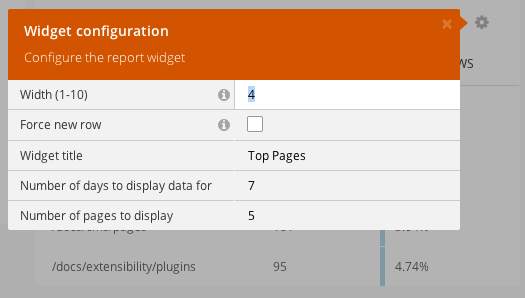
这些属性应该在部件类的defineProperties方法中定义。这些属性在检查器类型中有描述。
php
public function defineProperties()
{
    return [
        'title' => [
            'title' => 'Widget title',
            'default' => 'Top Pages',
            'type' => 'string',
            'validation' => [
                'required' => [
                    'message' => 'The Widget Title is required.'
                ],
            ]
        ],
        'days' => [
            'title' => 'Number of days to display data for',
            'default' => '7',
            'type' => 'string',
            'validation' => [
                'regex' => [
                    'message' => 'The days property can contain only numeric symbols.',
                    'pattern' => '^[0-9]+

## Report Widget Registration

Plugins can register report widgets by overriding the `registerReportWidgets` method inside the [plugin registration file](../extending.md). The method should return an array containing the widget classes in the keys and widget configuration (label, context, and required permissions) in the values.

```php
public function registerReportWidgets()
\{
    return [
        \RainLab\GoogleAnalytics\ReportWidgets\TrafficOverview::class => [
            'label' => 'Google Analytics traffic overview',
            'context' => 'dashboard',
            'permissions' => [
                'rainlab.googleanalytics.widgets.traffic_overview',
            ],
        ],
        \RainLab\GoogleAnalytics\ReportWidgets\TrafficSources::class => [
            'label' => 'Google Analytics traffic sources',
            'context' => 'dashboard',
            'permissions' => [
                'rainlab.googleanaltyics.widgets.traffic_sources',
            ],
        ]
    ];
}
label 元素定义了添加组件弹出窗口的组件名称。context 元素定义了组件可以使用的上下文。October 的报表组件系统允许在任何页面上托管报表容器,并且容器上下文名称是唯一的。仪表板页面上的组件容器使用 dashboard 上下文。
]
]
]
];
}
## Report Widget Registration

Plugins can register report widgets by overriding the `registerReportWidgets` method inside the [plugin registration file](../extending). The method should return an array containing the widget classes in the keys and widget configuration (label, context, and required permissions) in the values.


The **label** element defines the widget name for the Add Widget popup window. The **context** element defines the context where the widget could be used. October's report widget system allows to host the report container on any page, and the container context name is unique. The widget container on the Dashboard page uses the **dashboard** context.