数据源
创建数据源
每个插件都可以注册任意数量的数据源。建议为插件提供的每种类型的数据创建一个新的数据源。例如,如果一个插件同时提供客户数据和销售数据,拥有两个独立的数据源将简化最终用户的小部件配置。
数据源是扩展 Dashboard\Classes\ReportDataSourceBase 类的类。每个数据源必须注册至少一个指标和一个维度。此外,数据源类必须实现 fetchData 方法,该方法需要返回 ReportFetchDataResult 对象。在大多数情况下,当你的数据源从数据库中获取数据时,你可以使用 ReportDataQueryBuilder 类,它根据维度和指标配置构建并执行数据库查询。
php
use Db;
use Carbon\Carbon;
use Dashboard\Classes\ReportMetric;
use Dashboard\Classes\ReportDimension;
use Dashboard\Classes\ReportDimensionField;
use Dashboard\Classes\ReportDataSourceBase;
use Dashboard\Classes\ReportFetchData;
use Dashboard\Classes\ReportFetchDataResult;
use Dashboard\Classes\ReportDataOrderRule;
use Dashboard\Classes\ReportDataPaginationParams;
use Dashboard\Classes\ReportDataQueryBuilder;

class MyReportDataSource extends ReportDataSourceBase
{
    public function __construct()
    {
        // Register dimensions and metrics here
    }

    protected function fetchData(ReportFetchData $data): ReportFetchDataResult
    {
        // Construct and return a ReportFetchDataResult object,
        // or use the ReportDataQueryBuilder class to do the hard work.
    }
}
ReportFetchData 对象具有以下可用属性.
| Property | Type | Description |
|---|---|---|
| $dimension | ReportDimension | the dimension to group the data by |
| $metrics | array | the metrics to return |
| $metricsConfiguration | array | the report metrics configuration |
| $dateStart | ?Carbon | the start date |
| $dateEnd | ?Carbon | the end date |
| $startTimestamp | ?int | the start date |
| $dimensionFilters | array | the filters to apply to the dimension values |
| $groupInterval | ?string | the group interval. |
| $orderRule | ?ReportDataOrderRule | the data ordering rule. |
| $limit | ?int | the maximum number of records to return. |
| $paginationParams | ?ReportDataPaginationParams | the pagination parameters. |
| $hideEmptyDimensionValues | bool | indicates whether empty dimension values must be removed from the dataset. |
| $totalsOnly | bool | indicates that the method should only return total values for metrics, and not rows. |
插件必须在其 boot 方法内,在插件注册文件 (Plugin.php) 中注册它们的数据源。
php
use Dashboard\Classes\DashManager;

public function boot()
{
    DashManager::instance()->registerDataSourceClass(
        MyReportDataSource::class,
        'My Custom Data Source' // This can be a reference to a localization string
    );
}
我们将使用一个简单的电子商务插件数据库结构用于文档示例。该插件包含以下表。
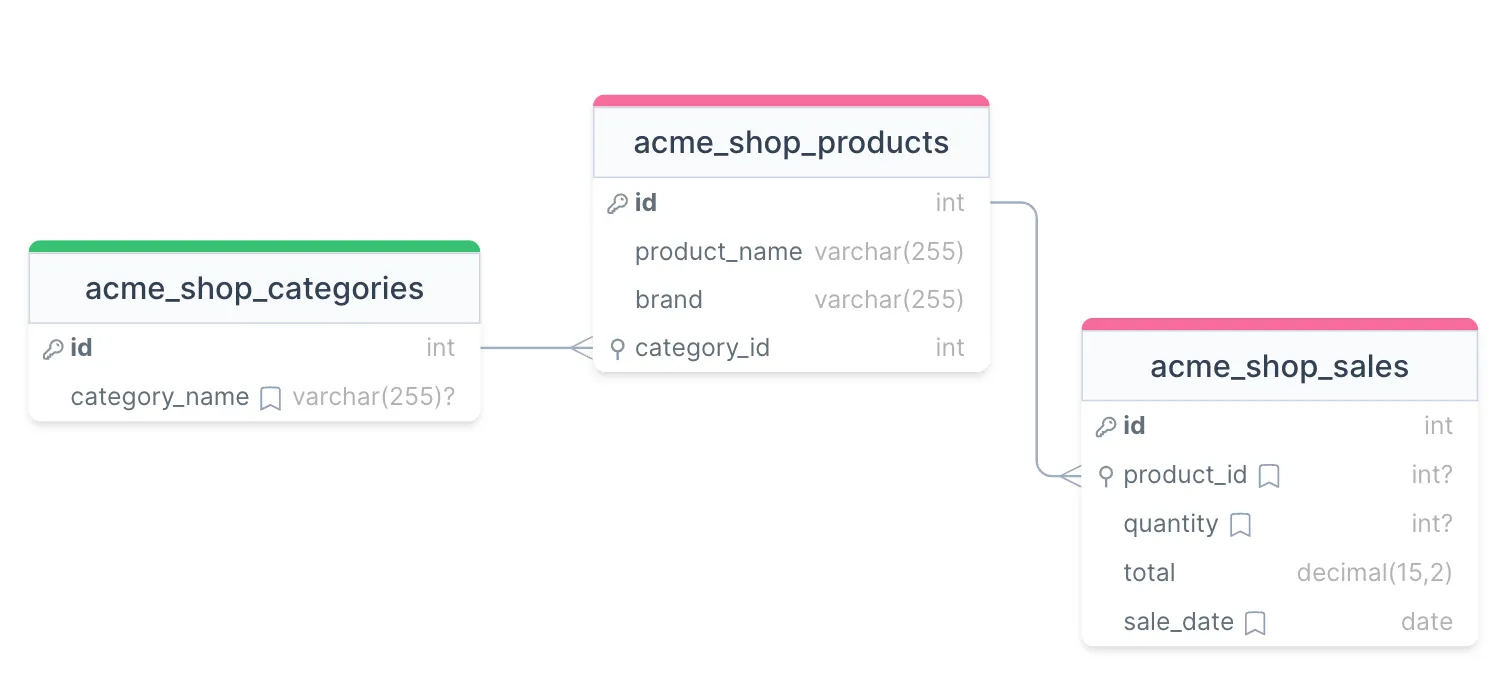
我们将创建一个数据源来显示产品和类别的销售数据以表格、图表和指标的形式。
注册尺寸
数据源必须在构造函数中注册它们的指标和维度。使用 registerDimension 方法来注册一个维度。让我们首先为我们的电子商务插件示例注册产品维度。
php
const DIMENSION_PRODUCT = 'product';

public function __construct()
{
    $this->registerDimension(new ReportDimension(
        self::DIMENSION_PRODUCT,
        'acme_shop_products.id',
        'Product',
        'product_name'
    ));
}
registerDimension 方法接受一个 ReportDimension 对象。ReportDimension 的构造函数接受以下参数。
| Argument | Type | Description |
|---|---|---|
| $code | string | specifies the dimension referral code. Your data source will use this code to distinguish the dimension in the fetchData calls. It can be a simple string, for example, “city”. |
| $databaseColumnName | string | specifies the dimension column name in the data source table. The column name is used in ReportDataQueryBuilder to construct database queries. Including the table name (acme_shop_products in this case) along with the column name is often necessary to avoid ambiguity when the data source query includes multiple tables. If your data source is not database-driven, any value can be used for this argument. In most instances, the dimension column corresponds to the primary key in the dimension table. |
| $displayName | string | specifies the dimension name used in reports. For example, in the Table widget, this could become the title of the dimension column. It is also used in the widget configuration popup, in the dimension dropdown. The value for this argument can be a static string, or a reference to a localization string. |
| $labelColumnName | ?string | specifies the name of the column for the dimension label. Use this column to provide a user-friendly label for the dimension. If this argument is not provided, the value of $databaseColumnName is used as the dimension label. Keep in mind that widget dimension sorting and filters will utilize the dimension label value when the label column name provided. |
registerDimension 方法返回注册的维度对象,允许进行链式调用。
注册数据源和维度后,您应该能够在仪表盘小部件配置器中查看它们。
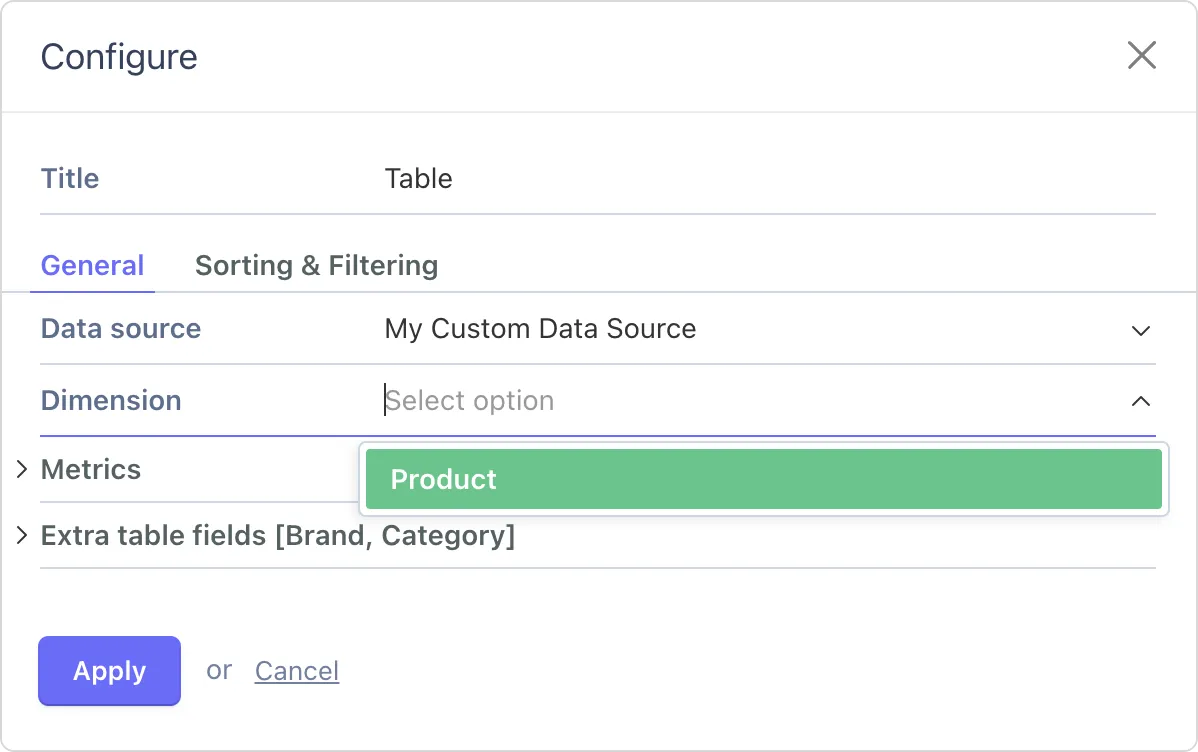
注册指标
我们可以注册与产品相关的两个指标:销售额和数量。这些指标使用数据源类的 registerMetric 方法进行注册。
php
const METRIC_TOTAL_AMOUNT = 'total_amount';
const METRIC_TOTAL_QUANTITY = 'total_quantity';

public function __construct()
{
    ...

    $this->registerMetric(new ReportMetric(
        self::METRIC_TOTAL_AMOUNT,
        'acme_shop_sales.total',
        'Total amount',
        ReportMetric::AGGREGATE_SUM
    ));

    $this->registerMetric(new ReportMetric(
        self::METRIC_TOTAL_QUANTITY,
        'acme_shop_sales.quantity',
        'Quantity',
        ReportMetric::AGGREGATE_SUM
    ));
}
registerMetric 方法接受一个 ReportMetric 对象。该类的构造函数具有以下参数:
| Argument | Type | Description |
|---|---|---|
| $code | string | the metric referral code. |
| $databaseColumnName | string | the metric column name. It's always a good idea to provide the table name along with the field name to avoid ambiguity in SQL queries. |
| $displayName | string | the metric name used in reports. |
| $aggregateFunction | string | the aggregate function for the metric. One of the ReportMetric::AGGREGATE_XXX constants. |
| $intlFormatOptions | ?array | client-side formatting options, compatible with the Intl.NumberFormat() constructor options argument. Skip the argument to use the default formatting options. |
仪表盘可以聚合指标数据使用以下函数之一:
php
ReportMetric::AGGREGATE_SUM
ReportMetric::AGGREGATE_AVG
ReportMetric::AGGREGATE_MIN
ReportMetric::AGGREGATE_MAX
ReportMetric::AGGREGATE_COUNT
ReportMetric::AGGREGATE_NONE
ReportMetric::AGGREGATE_COUNT_DISTINCT
ReportMetric::AGGREGATE_COUNT_DISTINCT_NOT_NULL对于我们的需求,SUM 函数最适合,因为我们的指标是总数量和总金额。因此,我们在这两个指标的构造函数中使用了 ReportMetric::AGGREGATE_SUM。
注册完指标后,你可以将它们添加到仪表板小组件配置中:
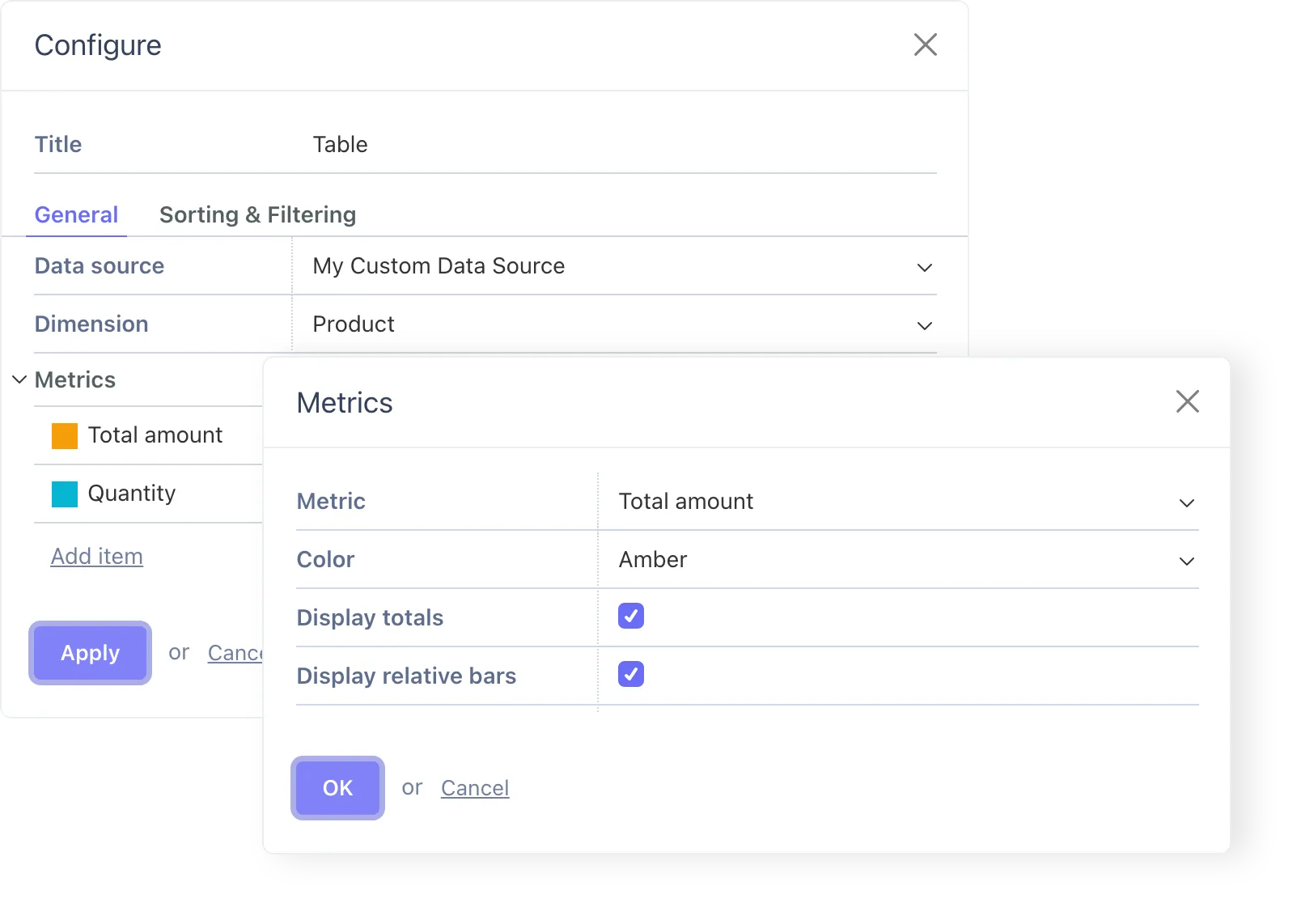
从数据源返回数据
数据源应实现 fetchData 方法,以返回所请求的维度、指标和维度字段的数据。此方法有相当多的参数,但在大多数情况下,如果您的数据源与数据库配合使用,您可以将它们直接传递给 ReportDataQueryBuilder 类。
ReportDataQueryBuilder 类 的使用是可选的。 fetchData 方法 的唯一要求是返回一个 Dashboard\Classes\ReportFetchDataResult 对象。 实现这一目标的方法无关紧要。 如果您的数据源不与数据库配合使用,或者您发现 ReportDataQueryBuilder 不够灵活无法满足您的需求,您可以使用原生的 Laravel 类来加载数据。
以下是我们演示电商数据源的部分实现:
php
protected function fetchData(ReportFetchData $data): ReportFetchDataResult
{
    if ($dimension->getCode() !== self::DIMENSION_PRODUCT) {
        throw new SystemException('Invalid dimension');
    }

    $reportQueryBuilder = new ReportDataQueryBuilder(
        'acme_shop_products',
        $data->dimension,
        $data->metrics,
        $data->orderRule,
        $data->dimensionFilters,
        $data->limit,
        $data->paginationParams,
        $data->groupInterval,
        $data->hideEmptyDimensionValues,
        $data->dateStart,
        $data->dateEnd,
        $data->startTimestamp,
        'acme_shop_sales.sale_date',
        null,
        $data->totalsOnly
    );

    // ...
}
该 ReportDataQueryBuilder 类的构造函数接受大部分 fetchData 参数,并带有一些补充:
- 第一个参数是用于获取数据的主表名。
它通常是与所请求维度关联的表。
在我们的例子中,由于维度是产品ID,我们使用acme_shop_products表作为主查询表。 - 该构造函数还接受一个日期列的名称, 该日期列用于将返回的数据限制在用户请求的时间间隔内。 在我们的案例中, 我们将使用销售日期列
acme_shop_sales.sale_date。 - 此外,构造函数接受一个时间戳列名。尽管仪表盘的默认最小时间分辨率为一天,但某些小组件可以获取过去一小时的数据,这由时间戳列启用。为求简洁,我们不实现此功能,并将
null作为参数值传递。
由于我们的指标属于一个不同于维度表的表,我们需要配置报告数据查询构建器对象以从 acme_shop_sales 表加载指标数据。这通过使用 onConfigureMetrics 方法实现:
php
$reportQueryBuilder->onConfigureMetrics(
    function(Builder $query, ReportDimension $dimension, array $metrics) {
        $query->leftJoin('acme_shop_sales', function($join) {
            $join->on('acme_shop_sales.product_id', '=', 'acme_shop_products.id');
        });
    }
);
该方法接受一个回调函数,该函数必须接收一个 Illuminate\Database\Query\Builder 对象、一个维度对象以及一个指标数组作为参数。这使得实现具有高度可定制性。在我们简单的例子中,我们只使用 Laravel 的查询构建器对象来连接销售表。
最后,一旦报表数据查询构建器配置完成,我们就可以执行这些查询并返回加载的数据:
php
return $reportQueryBuilder->getFetchDataResult($metricsConfiguration);以下是 fetchData 方法的完整实现:
php
protected function fetchData(ReportFetchData $data): ReportFetchDataResult
{
    if ($data->dimension->getCode() !== self::DIMENSION_PRODUCT) {
        throw new SystemException('Invalid dimension');
    }

    $reportQueryBuilder = new ReportDataQueryBuilder(
        'acme_shop_products',
        $data->dimension,
        $data->metrics,
        $data->orderRule,
        $data->dimensionFilters,
        $data->limit,
        $data->paginationParams,
        $data->groupInterval,
        $data->hideEmptyDimensionValues,
        $data->dateStart,
        $data->dateEnd,
        $data->startTimestamp,
        'acme_shop_sales.sale_date',
        null,
        $data->totalsOnly
    );

    $reportQueryBuilder->onConfigureMetrics(
        function(Builder $query, ReportDimension $dimension, array $metrics) {
            $query->leftJoin('acme_shop_sales', function($join) {
                $join->on('acme_shop_sales.product_id', '=', 'acme_shop_products.id');
            });
        }
    );

    return $reportQueryBuilder->getFetchDataResult($data->metricsConfiguration);
}
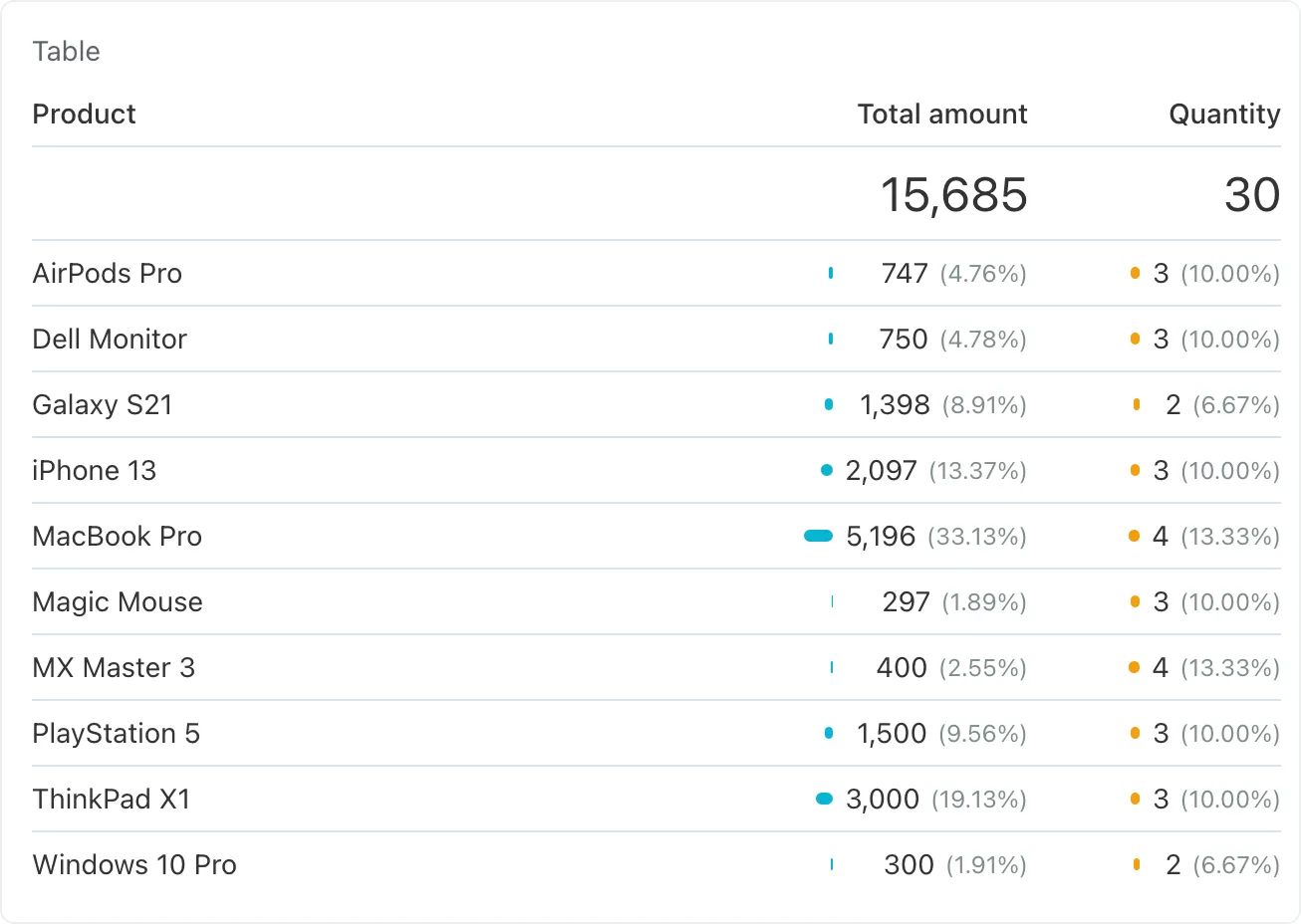
此配置足以在表格小部件中显示数据源数据:
格式化指标数据
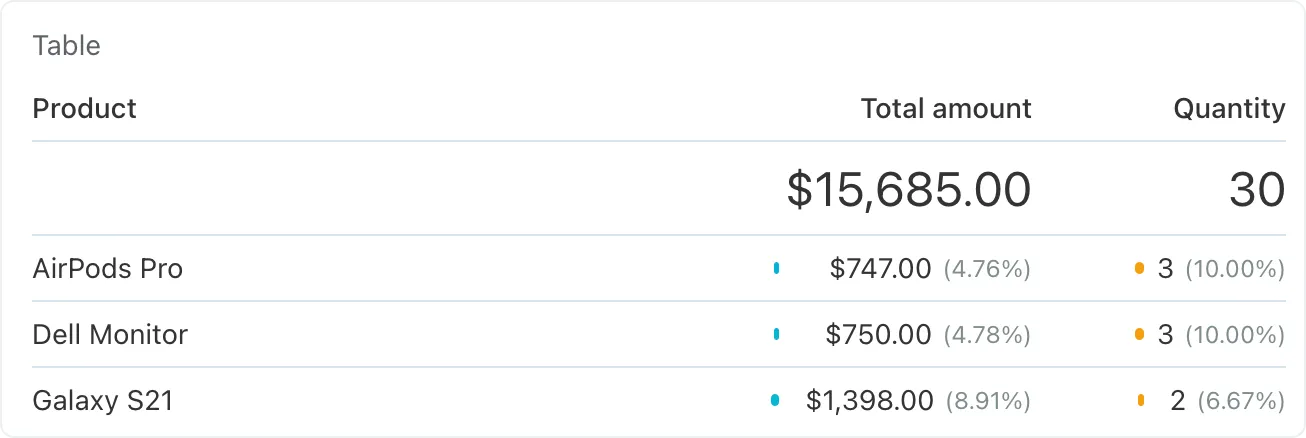
默认情况下,仪表盘将指标数据格式化为数字。如果默认格式不适用,您可以配置指标以其他格式显示数据。在我们的电商示例中,将总金额显示为货币是合理的。
ReportMetric 类构造函数的最后一个参数接受一个与 Intl.NumberFormat 的 options 参数兼容的选项数组,这是一个浏览器 API。下面的示例演示了一种理想的配置,用于以美国格式显示货币:
php
$this->registerMetric(new ReportMetric(
    self::METRIC_TOTAL_AMOUNT,
    'acme_shop_sales.total',
    'Total amount',
    ReportMetric::AGGREGATE_SUM,
    [
        'style' => 'currency',
        'currency' => 'USD',
    ]
));
更新后的指标数据在仪表板上显示如下:
显示额外维度数据
在我们的演示数据库结构中,products 表有一个 brand 列。此外,它引用了 categories 表,确保每个产品都链接到一个类别。我们可以在报告中利用维度字段功能显示品牌和类别名称以及产品名称。
维度字段应添加到数据源构造函数中的一个维度。维度对象包含 addDimensionField 方法,该方法接受一个配置好的维度字段对象。以下是我们如何为品牌和类别名称向产品维度添加维度字段:
php
$this->registerDimension(new ReportDimension(
    self::DIMENSION_PRODUCT,
    'acme_shop_products.id',
    'Product',
    'product_name'
))->addDimensionField(new ReportDimensionField(
    'oc_field_brand',
    'Brand',
    'brand',
    true,
    true
))->addDimensionField(new ReportDimensionField(
    'oc_field_category',
    'Category',
    'acme_shop_categories.category_name',
    true,
    true
));
ReportDimensionField 构造函数接受这些参数:
| Argument | Type | Description |
|---|---|---|
| $code | string | specifies the field referral code. The code must begin with the oc_field_ prefix. |
| $displayName | string | specifies the field name to use in reports. For example, in the Table widget, this could become the title of the dimension column. It is also used in the widget configuration popup, in the dimension dropdown. The value for this argument can be a static string, or a reference to a localization string. |
| $columnName | ?string | optional database column name for filtering or sorting. Provide the column name to enable sorting and filtering. In most cases, you should specify a value for this argument. |
| $sortable | bool | specifies if the field is sortable. |
| $filterable | bool | specifies if the field is filterable. |
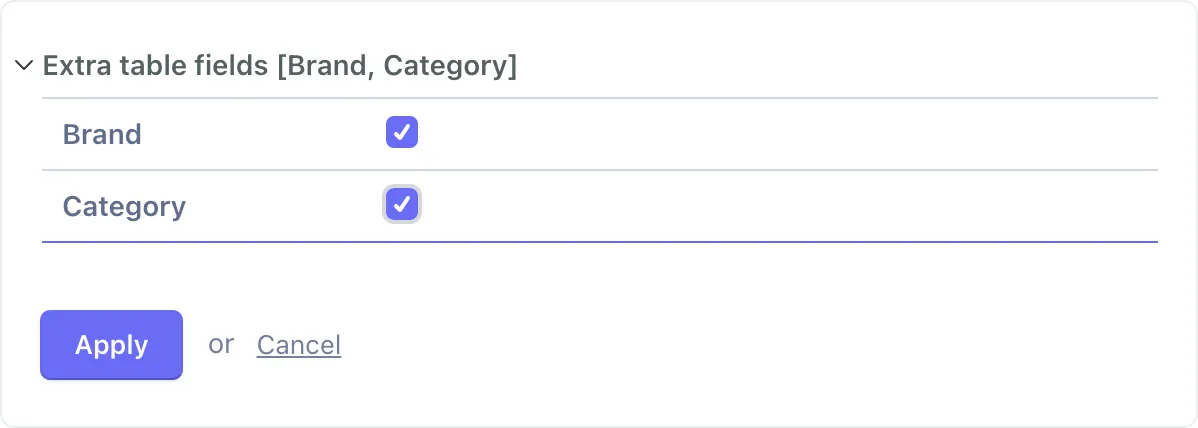
注册后,维度字段将出现在仪表盘组件配置器中:
剩下的任务是返回维度字段的数据。由于 ReportDataQueryBuilder 类不会自动执行此过程,因此有必要配置其底层查询,以添加连接并将相应的列添加到查询中。这可以在 onConfigureQuery 回调中完成:
php
$reportQueryBuilder->onConfigureQuery(
    function(Builder $query, ReportDimension $dimension, array $metrics) {
        $query->leftJoin('acme_shop_categories', function($join) {
            $join->on('acme_shop_categories.id', '=', 'acme_shop_products.category_id');
        });

        $query->addSelect([
            Db::raw('max(acme_shop_products.brand) as oc_field_brand'),
            Db::raw('max(acme_shop_categories.category_name) as oc_field_category'),
        ]);
    }
);
我们对产品品牌和类别使用 max 函数可能看起来很奇怪。 之所以这是必要的,是因为查询是根据产品 ID 列(维度)进行分组的,我们必须对所有列使用聚合函数以避免 MySQL 错误。 这个简单的技巧解决了这个问题。
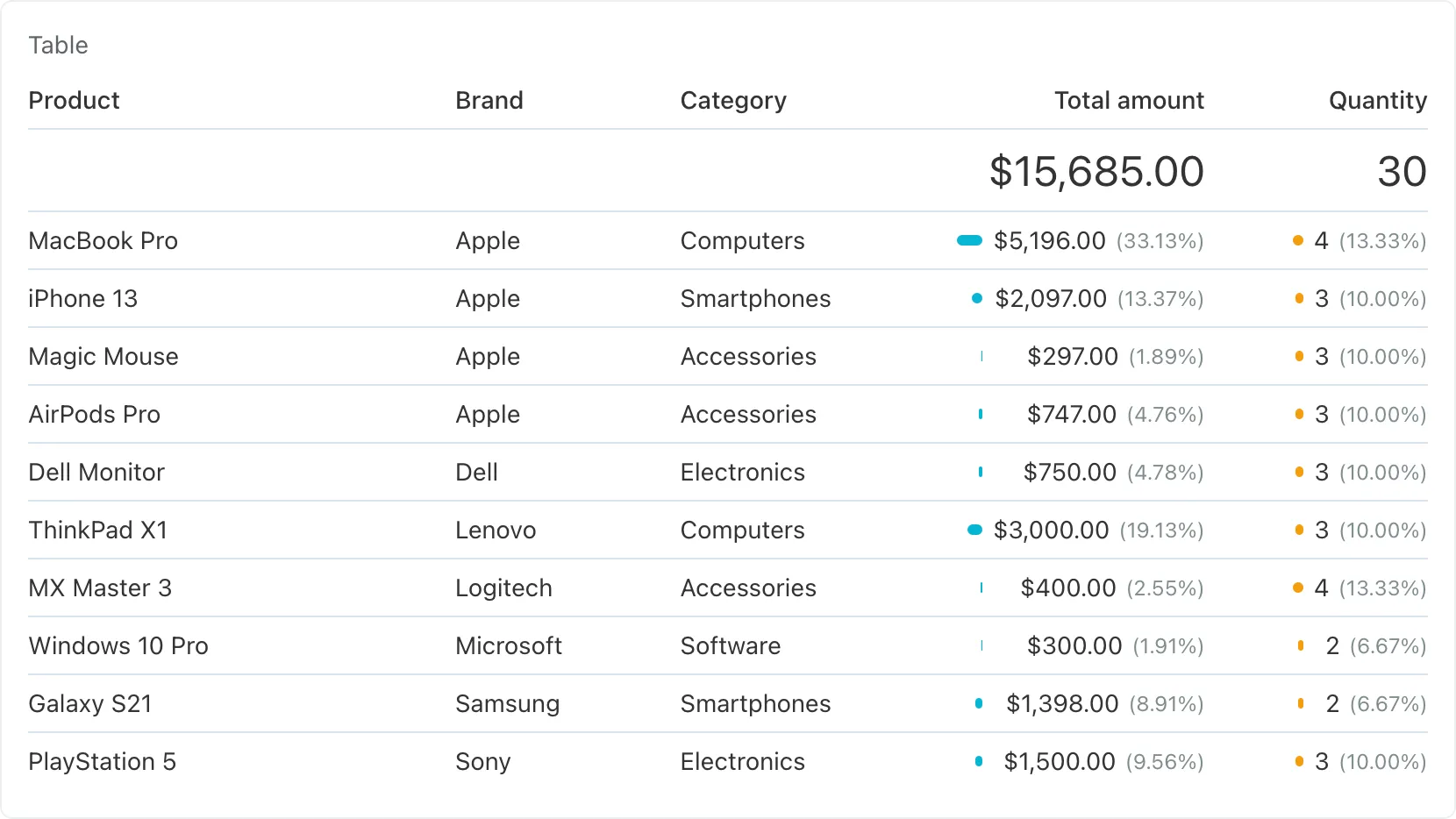
维度字段现已在控制面板中可供预览。用户可以配置小部件以按品牌或类别列对数据进行排序:
使用数据源
配置妥当的数据源即可立即用于所有类型的仪表盘小部件而无需额外设置。例如, 您可以配置图表小部件来显示热门产品。
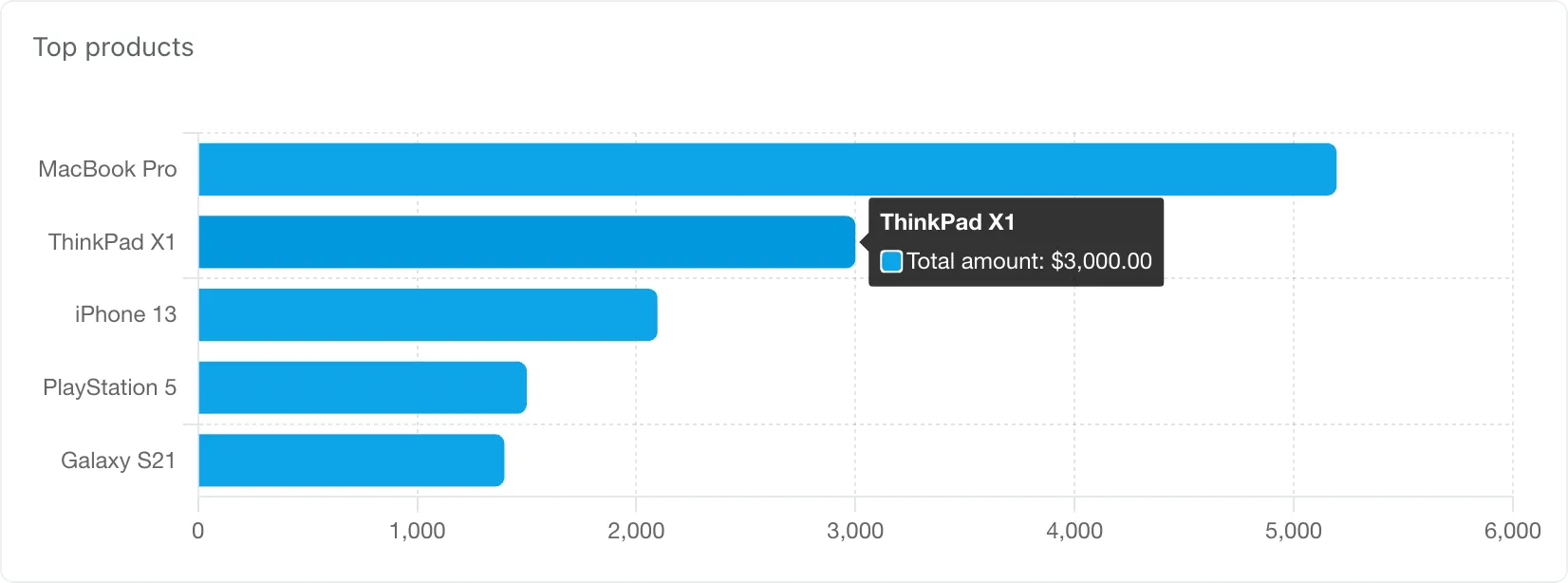
在此示例中,图表小部件设置如下:
- 图表类型: 柱状图
- 方向:水平
- 数据源:我们的测试数据源
- 维度: 产品
- 指标: 总量
- 限制: 5
- 排序方式:总金额
- 排序顺序: 降序
- 显示: 仪表盘间隔
您还可以配置指标小部件来显示总计,并可以选择按特定品牌或类别过滤数据:

在此示例中,智能手机指标小组件的设置如下:
- 数据源: 我们的测试数据源
- 维度:产品
- 值: 总金额
- 筛选器属性: 类别
- 筛选操作: 等于
- 值:智能手机
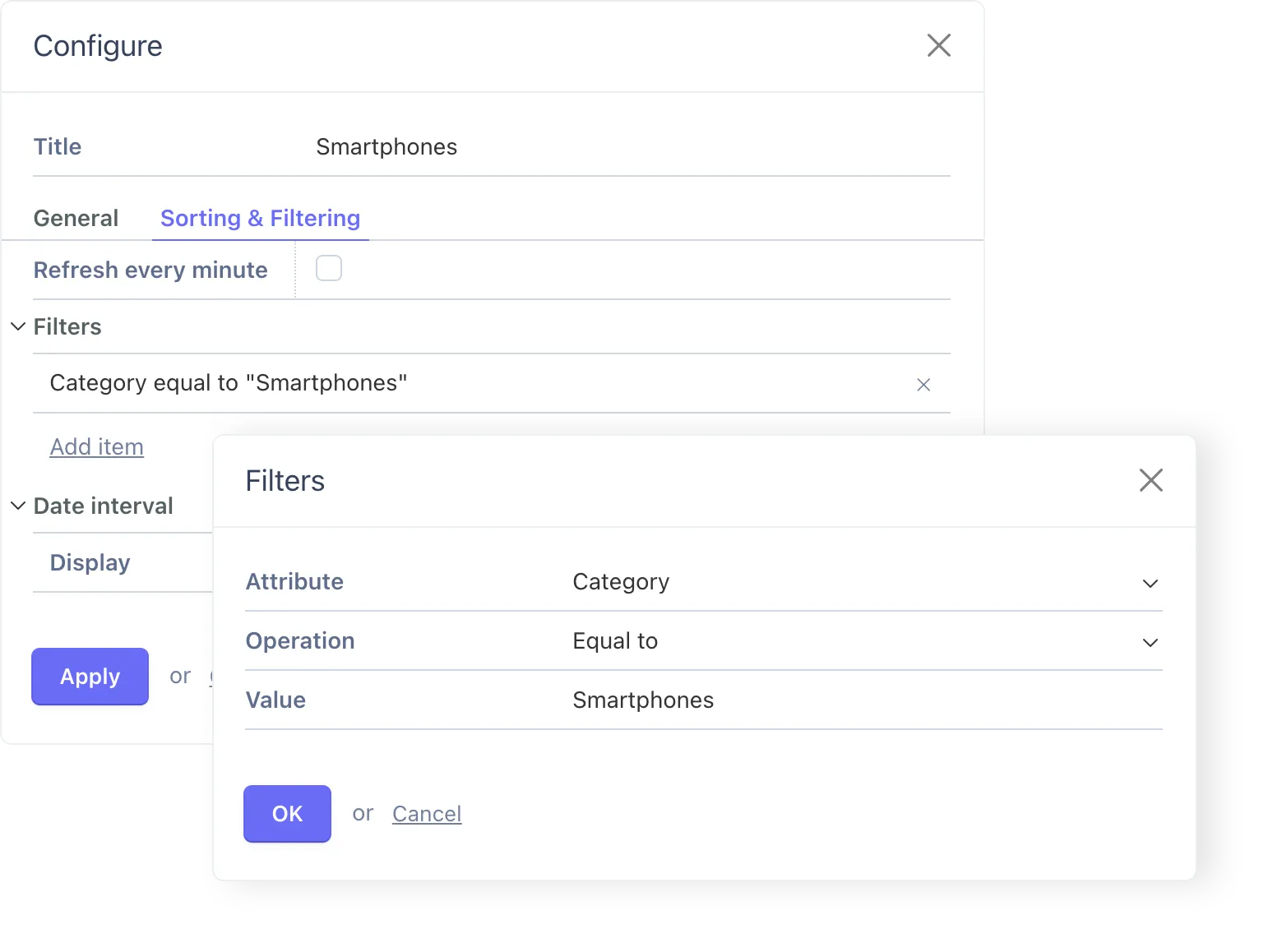
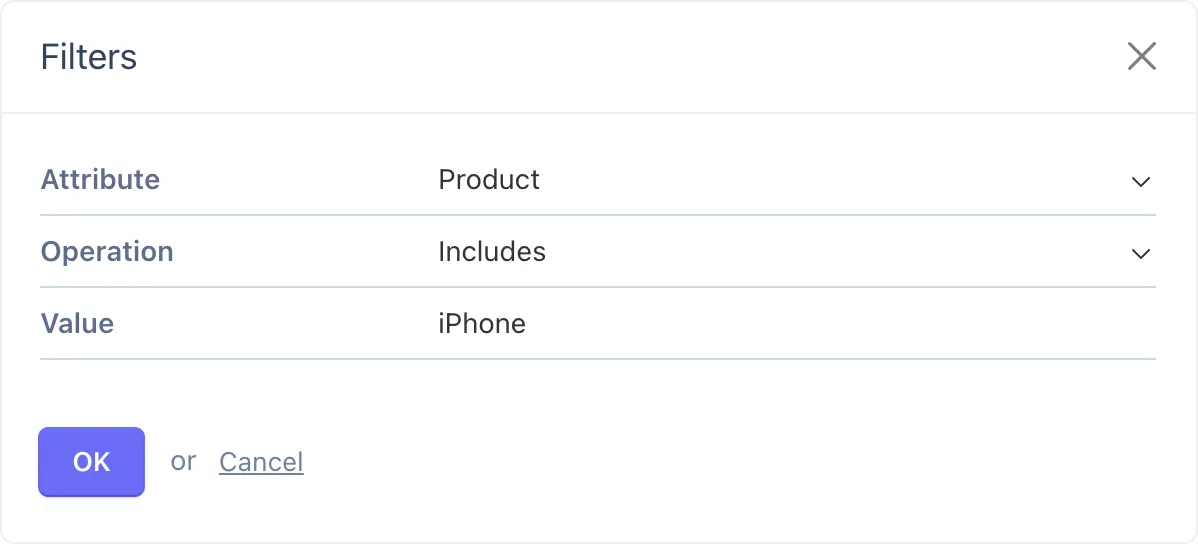
iPhone 的指示器小组件使用以下筛选器配置:
- 属性: 产品
- 操作:包括
- 值: iPhone