报告小部件
报表小部件可用于后端仪表板以及其他后端报告容器中。 报表小部件必须在插件注册文件中注册。
报表微件类位于插件的 reportwidgets 目录中。
与任何其他插件类一样,通用微件控制器应该属于插件命名空间。
与所有后端微件类似,报表微件使用局部文件和特殊的目录布局。
示例目录布局:
├── reportwidgets
| ├── trafficsources
| | └── partials
| | └── _widget.php ← 分部文件
| └── TrafficSources.php ← 小部件类
类定义
create:reportwidget 命令生成后端报表部件、视图和基本资产文件。第一个参数指定作者和插件名称。第二个参数指定报表部件类名称。
bash
php artisan create:reportwidget Acme.Blog TopPosts报表小部件类必须扩展 Dashboard\Classes\ReportWidgetBase 类。报表小部件类定义示例。该类应重写 render 方法,以便渲染小部件自身。
php
namespace RainLab\GoogleAnalytics\ReportWidgets;

use Dashboard\Classes\ReportWidgetBase;

class TrafficSources extends ReportWidgetBase
{
    public function render()
    {
        return $this->makePartial('widget');
    }
}
小部件局部模板可以包含您想在小部件中显示的任何 HTML 标记. 该标记应封装到带有 **report-widget** 类的 DIV 元素中. 建议使用 H3 元素输出小部件标题. 示例小部件局部模板:
html
<div class="report-widget">
    <h3>Traffic sources</h3>

    <div
        class="control-chart"
        data-control="chart-pie"
        data-size="200"
        data-center-text="180">
        <ul>
            <li>Direct <span>1000</span></li>
            <li>Social networks <span>800</span></li>
        </ul>
    </div>
</div>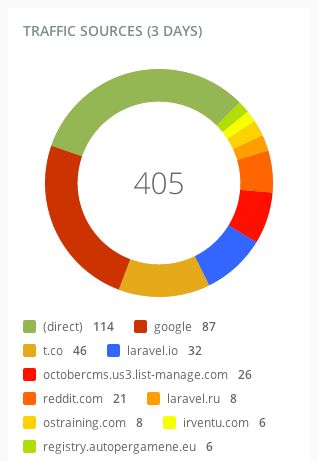
在报表小部件内部,您可以使用任何 图表或指标、列表或任何其他您希望的标记。请记住,报表小部件扩展了通用后端小部件,并且您可以在报表小部件中使用任何小部件功能。下一个示例展示了一个列表报表小部件的标记。
html
<div class="report-widget">
    <h3>Top pages</h3>

    <div class="table-container">
        <table class="table data" data-provides="rowlink">
            <thead>
                <tr>
                    <th><span>Page URL</span></th>
                    <th><span>Pageviews</span></th>
                    <th><span>% Pageviews</span></th>
                </tr>
            </thead>
            <tbody>
                <tr>
                    <td>/</td>
                    <td>90</td>
                    <td>
                        <div class="progress">
                            <div class="bar" style="90%"></div>
                            <a href="/">90%</a>
                        </div>
                    </td>
                </tr>
                <tr>
                    <td>/docs</td>
                    <td>10</td>
                    <td>
                        <div class="progress">
                            <div class="bar" style="10%"></div>
                            <a href="/docs">10%</a>
                        </div>
                    </td>
                </tr>
            </tbody>
        </table>
    </div>
</div>
报表小部件属性
报表小部件可能具有用户可以使用检查器管理的属性:
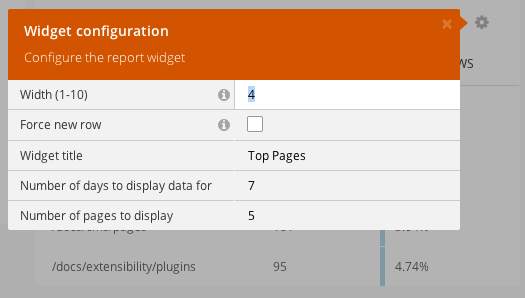
The properties should be defined in the defineProperties method of the widget class. The properties are described in the inspector types.
php
public function defineProperties()
{
    return [
        'title' => [
            'title' => 'Widget title',
            'default' => 'Top Pages',
            'type' => 'string',
            'validation' => [
                'required' => [
                    'message' => 'The Widget Title is required.'
                ],
            ]
        ],
        'days' => [
            'title' => 'Number of days to display data for',
            'default' => '7',
            'type' => 'string',
            'validation' => [
                'regex' => [
                    'message' => 'The days property can contain only numeric symbols.',
                    'pattern' => '^[0-9]+

## Report Widget Registration

Plugins can register report widgets by overriding the `registerReportWidgets` method inside the [plugin registration file](../extending.md). The method should return an array containing the widget classes in the keys and widget configuration (label, group, and required permissions) in the values.

```php
public function registerReportWidgets()
\{
    return [
        \RainLab\GoogleAnalytics\ReportWidgets\TrafficOverview::class => [
            'label' => 'Google Analytics traffic overview',
            'group' => 'Widgets',
            'permissions' => [
                'rainlab.googleanalytics.widgets.traffic_overview',
            ],
        ],
        \RainLab\GoogleAnalytics\ReportWidgets\TrafficSources::class => [
            'label' => 'Google Analytics traffic sources',
            'group' => 'Widgets',
            'permissions' => [
                'rainlab.googleanaltyics.widgets.traffic_sources',
            ],
        ]
    ];
}
该 label 元素定义了“添加小部件”弹出窗口的小部件名称。该 group 元素定义了小部件可在其中被选中的菜单项上下文。
]
]
]
];
}
## Report Widget Registration

Plugins can register report widgets by overriding the `registerReportWidgets` method inside the [plugin registration file](../extending). The method should return an array containing the widget classes in the keys and widget configuration (label, group, and required permissions) in the values.


The **label** element defines the widget name for the Add Widget popup window. The **group** element defines the menu item context where the widget can be selected.